
200-301 · Question #131
Drag and Drop Question Refer to the exhibit. Drag and drop the networking parameters from the left on to the correct values on the right. Answer:
The correct answer is OSPF process ID; router ID; IP address; netmask; area ID; timers. OSPF Parameter Drag-and-Drop - Explanation Without the exhibit image, this question is almost certainly matching parameters to positions in an OSPF configuration or show ip ospf interface output. The correct order follows the logical hierarchy of how OSPF is configured and…
Question
Exhibits
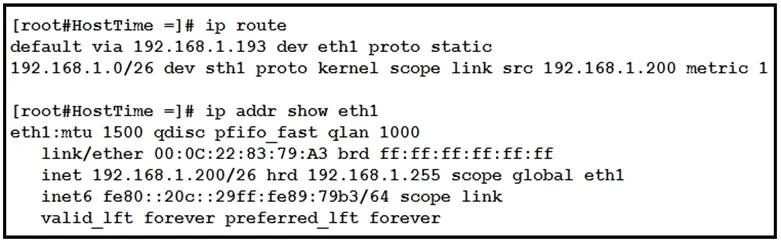
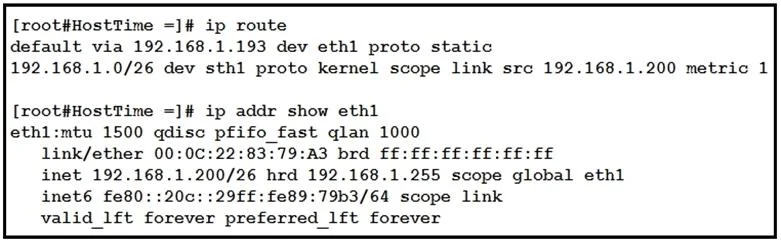
Answer Area
Drag items
Correct arrangement
- OSPF process ID
- router ID
- IP address
- netmask
- area ID
- timers
Explanation
OSPF Parameter Drag-and-Drop - Explanation
Without the exhibit image, this question is almost certainly matching parameters to positions in an OSPF configuration or show ip ospf interface output. The correct order follows the logical hierarchy of how OSPF is configured and operates.
The Arrangement Explained
1. OSPF Process ID
- Appears first in the
router ospf <process-id>command. - Locally significant - it identifies the OSPF process on this router only. Two routers can form an adjacency even if their process IDs differ.
- Common mistake: Confusing process ID with area ID. They are unrelated numbers.
2. Router ID
- A 32-bit value (written in dotted-decimal, e.g.,
1.1.1.1) that uniquely identifies the router within the OSPF domain. - Selected automatically (highest loopback IP, then highest active interface IP) or set manually via
router-id. - Common mistake: Assuming the router ID must be a reachable IP address - it doesn't have to be.
3. IP Address
- The interface IP address participating in OSPF.
- Used to establish neighbor relationships and populate the link-state database.
4. Netmask
- The subnet mask associated with the IP address above.
- OSPF checks that neighbors on the same segment share the same subnet mask before forming an adjacency (unlike EIGRP, which does not check this).
- Common mistake: Thinking OSPF ignores the mask - it does not (except on point-to-point links).
5. Area ID
- Defines which OSPF area the interface belongs to (e.g.,
area 0= backbone). - Neighbors must share the same area ID to form an adjacency.
- Common mistake: Confusing area ID with process ID (see #1 above).
6. Timers
- Hello and Dead intervals (e.g., hello every 10s, dead after 40s).
- Listed last because they are tuning parameters, not identity or topology parameters.
- Common mistake: Forgetting that mismatched hello/dead timers prevent adjacency formation - they must match between neighbors.
Key Hierarchy to Remember
Process ID  ->  Router ID  ->  Interface (IP + Mask)  ->  Area  ->  Timers
(local)        (domain ID)   (addressing)              (topology) (tuning)
This ordering mirrors how OSPF is configured in Cisco IOS and how parameters appear in show ip ospf interface output.
Topics
Community Discussion
No community discussion yet for this question.