
200-301 · Question #1135
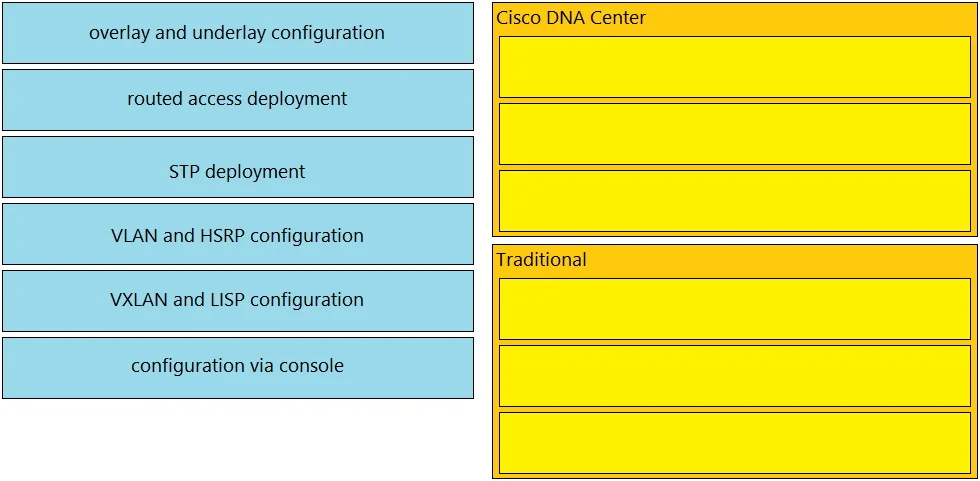
Drag and Drop Question Drag and drop the use cases of device-management technologies from the left onto the corresponding types on the right. Answer:
The correct answer is overlay and underlay configuration; routed access deployment; VXLAN and LISP configuration; STP deployment; VLAN and HSRP configuration; configuration via console. Drag-and-Drop Explanation: Device Management Technologies This question matches use cases to two device management paradigms. Based on the arrangement, the categories on the right are most likely: Cisco DNA Center (Catalyst Center) - items 1-3 Traditional CLI/Manual Management…
Question
Exhibit
Answer Area
Drag items
Correct arrangement
- overlay and underlay configuration
- routed access deployment
- VXLAN and LISP configuration
- STP deployment
- VLAN and HSRP configuration
- configuration via console
Explanation
Drag-and-Drop Explanation: Device Management Technologies
This question matches use cases to two device management paradigms. Based on the arrangement, the categories on the right are most likely:
- Cisco DNA Center (Catalyst Center) - items 1-3
- Traditional CLI/Manual Management - items 4-6
Item-by-Item Breakdown
1. overlay and underlay configuration -> DNA Center DNA Center abstracts and automates both the underlay (physical routed infrastructure) and overlay (fabric tunnels) in SD-Access. This dual-plane management is a core DNA Center function - not something done manually at scale.
2. routed access deployment -> DNA Center Routed access is a supported SD-Access design where access switches run Layer 3 all the way to the edge. DNA Center templates and automates this deployment model. Traditional management can technically do it, but routed access at scale is a DNA Center use case on exams.
3. VXLAN and LISP configuration -> DNA Center SD-Access fabric uses VXLAN for the data plane overlay and LISP for the control plane. DNA Center fully manages these protocols end-to-end. You would never manually configure VXLAN/LISP across a large SD-Access fabric - DNA Center does it programmatically.
4. STP deployment -> Traditional CLI
Spanning Tree Protocol is a classic Layer 2 technology configured via CLI (spanning-tree commands). It has no DNA Center automation model - it belongs to traditional campus designs.
5. VLAN and HSRP configuration -> Traditional CLI VLANs and HSRP (Hot Standby Router Protocol) are legacy L2/L3 redundancy technologies configured manually on switches and routers. These are hallmarks of traditional three-tier campus networks, not SD-Access fabrics.
6. configuration via console -> Traditional CLI Console access is the most fundamental, out-of-band management method. It's purely manual and by definition belongs to traditional management, not DNA Center.
Common Mistakes
| Mistake | Correction |
|---|---|
| Putting VXLAN/LISP under "traditional" because you know the CLI commands | VXLAN+LISP in context of SD-Access is always DNA Center-managed on exams |
| Thinking routed access is CLI-only | DNA Center has explicit routed access design support - the scale makes it a DNA Center use case |
| Conflating "overlay configuration" with VPN (vManage) | Here, overlay/underlay refers to SD-Access fabric, not SD-WAN - context is DNA Center |
| Placing VLAN config under DNA Center | DNA Center doesn't manage VLANs directly in the traditional sense - VLANs are legacy CLI territory |
Key mental model: If the technology is associated with SD-Access fabric automation -> DNA Center. If it's a traditional L2/L3 protocol configured per-device -> Traditional CLI.
Topics
Community Discussion
No community discussion yet for this question.