
200-201 · Question #554
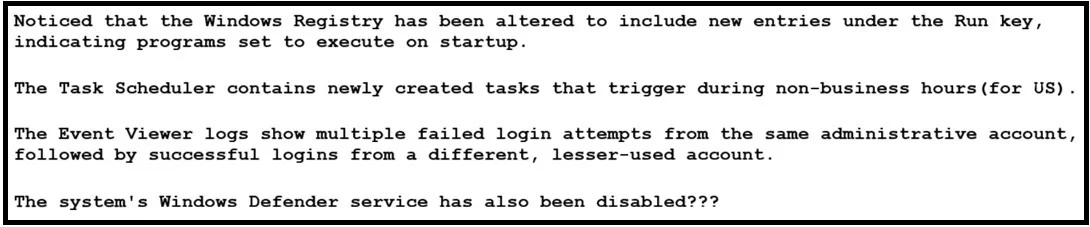
Refer to the exhibit. A security analyst wraps up the shift and passed open ticket notes to the night shift SOC team analyst. The ticket name in QUESTION 5is "Investigating suspicious activity on a…
The correct answer is C. Analyze the Windows Registry changes and Task Scheduler tasks. Persistence on Windows systems is most commonly achieved by configuring programs to automatically execute after reboot or on a schedule, which is done through startup-related registry keys and scheduled tasks. The modified Run keys and newly created Task Scheduler entries…
Question
Refer to the exhibit. A security analyst wraps up the shift and passed open ticket notes to the night shift SOC team analyst. The ticket name in QUESTION 5is “Investigating suspicious activity on a Windows Server”. Which operating system components must the analyst prioritize to uncover the attacker’s persistence mechanisms?
Exhibit
Options
- AReview the Windows Defender setup and failed login attempts in Event Viewer.
- BInvestigate the Task Scheduler entries and Windows Defender settings.
- CAnalyze the Windows Registry changes and Task Scheduler tasks.
- DFocus on the user account log-ins and delete newly added Run keys in the registry.
How the community answered
(36 responses)- A11% (4)
- B6% (2)
- C81% (29)
- D3% (1)
Explanation
Persistence on Windows systems is most commonly achieved by configuring programs to automatically execute after reboot or on a schedule, which is done through startup-related registry keys and scheduled tasks. The modified Run keys and newly created Task Scheduler entries directly indicate mechanisms the attacker is using to maintain continued access to the
Topics
Community Discussion
No community discussion yet for this question.