
200-201 · Question #229
Refer to the exhibit. An analyst was given a PCAP file, which is associated with a recent intrusion event in the company FTP server. Which display filters should the analyst use to filter the FTP…
The correct answer is B. tcp.port == 21. To filter FTP traffic in Wireshark, the display filter should target TCP port 21, which is the standard control port for FTP.
Question
Refer to the exhibit. An analyst was given a PCAP file, which is associated with a recent intrusion event in the company FTP server. Which display filters should the analyst use to filter the FTP traffic?
Exhibit
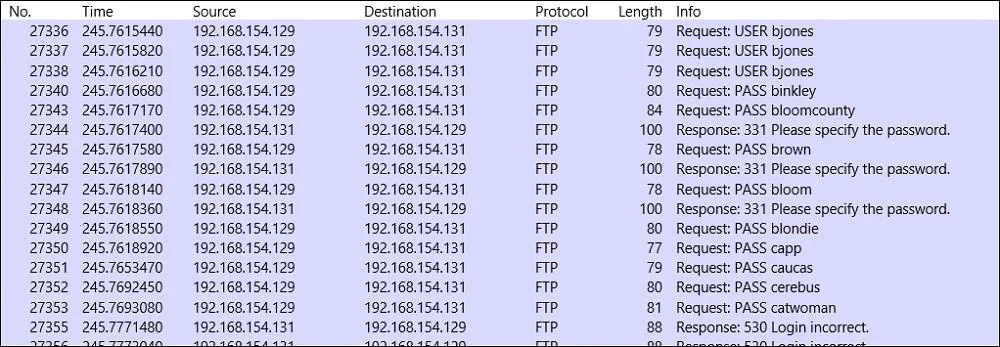
Options
- Adstport == FTP
- Btcp.port == 21
- Ctcpport = FTP
- Ddstport = 21
How the community answered
(33 responses)- A6% (2)
- B91% (30)
- C3% (1)
Why each option
To filter FTP traffic in Wireshark, the display filter should target TCP port 21, which is the standard control port for FTP.
`dstport == FTP` uses an invalid syntax for specifying a port; Wireshark requires numerical port values for this type of filter.
`tcp.port == 21` is the correct Wireshark display filter to capture all TCP traffic that uses port 21, which is the default control port for FTP, encompassing both source and destination traffic.
`tcpport = FTP` is syntactically incorrect, using a single equals sign instead of a double equals sign for comparison and attempting to use a service name instead of a numeric port.
`dstport = 21` uses an incorrect assignment operator (`=`) instead of the comparison operator (`==`) and only filters for destination port 21, potentially missing the server's source port traffic.
Concept tested: Wireshark display filters for FTP
Source: https://www.wireshark.org/docs/dfref/t/tcp.html
Topics
Community Discussion
No community discussion yet for this question.