
200-201 · Question #164
Refer to the exhibit. What does this output indicate?
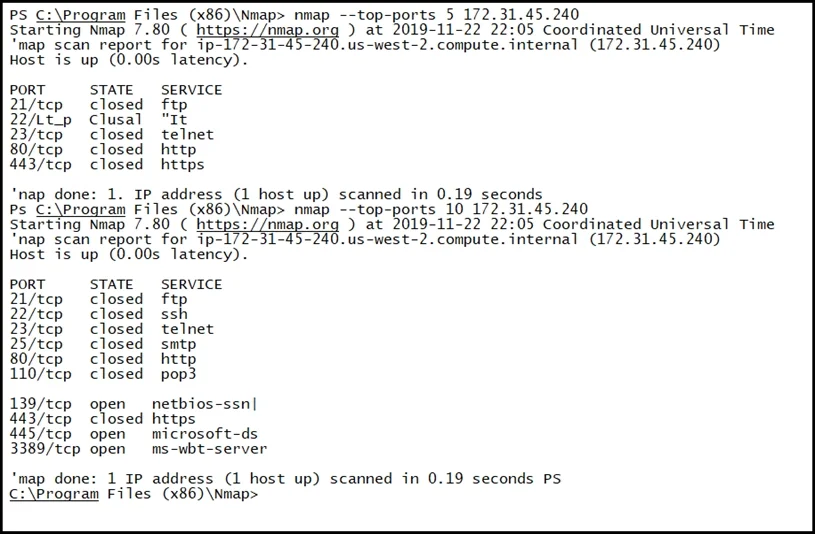
The correct answer is D. Email ports are closed on the server. The output indicates that the server is not listening on the standard ports associated with email services, implying these ports are closed.
Question
Refer to the exhibit. What does this output indicate?
Exhibit
Options
- AHTTPS ports are open on the server.
- BSMB ports are closed on the server.
- CFTP ports are open on the server.
- DEmail ports are closed on the server.
How the community answered
(63 responses)- A6% (4)
- B5% (3)
- C14% (9)
- D75% (47)
Why each option
The output indicates that the server is not listening on the standard ports associated with email services, implying these ports are closed.
If HTTPS ports (e.g., 443) were open, the output would show this port in a "LISTENING" state, contradicting the correct answer which implies closure of other ports.
If SMB ports (e.g., 139, 445) were closed, the output would explicitly show them as not listening or being blocked, but this option specifies SMB, not email.
If FTP ports (e.g., 20, 21) were open, the output would show these ports in a "LISTENING" state, which would mean FTP services are active.
The output, if showing standard email ports like 25 (SMTP), 110 (POP3), 143 (IMAP), 465 (SMTPS), or 587 (Submission) as not in a "LISTENING" or "OPEN" state, directly indicates that email services are not running or are blocked on the server, thus the ports are closed.
Concept tested: Network port status interpretation
Source: https://nmap.org/book/man-briefoptions.html
Topics
Community Discussion
No community discussion yet for this question.