
200-155 · Question #51
Refer to the exhibit. An engineer is presented with a VMWare ESX cluster consisting of two VMWare ESX hosts running Nexus 1000v. The guest system inventory consists of 100 static virtual desktops…
The correct answer is B. increase the max-ports setting for the VLAN 10. To allow all 100 virtual desktops on VLAN 10 to be online simultaneously, the max-ports setting specifically configured for VLAN 10 on the Nexus 1000V must be increased.
Question
Refer to the exhibit. An engineer is presented with a VMWare ESX cluster consisting of two VMWare ESX hosts running Nexus 1000v. The guest system inventory consists of 100 static virtual desktops. What change will permit all 100 guests to be online at the same time?
Exhibit
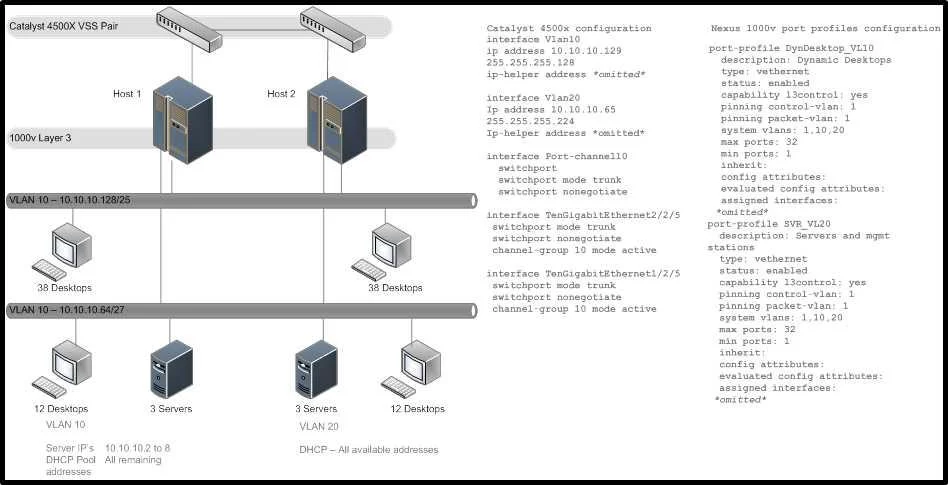
Options
- Aincrease the subnet size for VLAN 10 on the 4500x core
- Bincrease the max-ports setting for the VLAN 10
- Cincrease the global max-ports setting m the Nexus 1000v
- Dincrease the max-ports setting for both VLAN 10 and 20
How the community answered
(32 responses)- A16% (5)
- B75% (24)
- C6% (2)
- D3% (1)
Why each option
To allow all 100 virtual desktops on VLAN 10 to be online simultaneously, the `max-ports` setting specifically configured for VLAN 10 on the Nexus 1000V must be increased.
Increasing the subnet size on the core switch only impacts available IP addresses, not the number of virtual ports allowed to be active on the Nexus 1000V for a given VLAN.
The `max-ports` setting on a Cisco Nexus 1000V defines the maximum number of active virtual Ethernet interfaces (vEth interfaces) allowed for a specific VLAN; increasing this for VLAN 10 will permit more VMs to connect.
While a global `max-ports` setting might exist, the more granular and direct configuration for limiting VMs on a specific VLAN is the VLAN-specific `max-ports` setting, which is the direct cause of the issue.
The question states all 100 static virtual desktops are on VLAN 10; therefore, increasing the `max-ports` setting for VLAN 20 is irrelevant to the problem.
Concept tested: Cisco Nexus 1000V VLAN port limits
Source: https://www.cisco.com/c/en/us/td/docs/switches/datacenter/nexus1000v/sw/4_0_4_s1_3_2/command/reference/n1000v_cmdref/n1000v_v.html
Topics
Community Discussion
No community discussion yet for this question.