
200-155 · Question #157
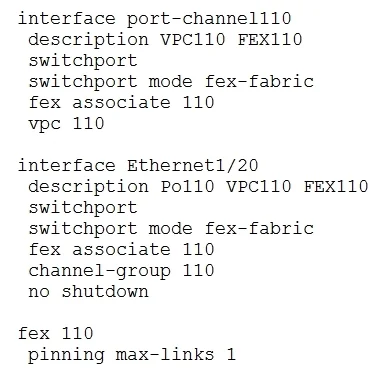
Refer to the exhibit. Which statement about the configuration is true?
The correct answer is A. The FEX has two uplinks to a single core switch. This question requires interpreting a Cisco Fabric Extender (FEX) configuration snippet to determine its uplink connectivity and behavior.
Question
Refer to the exhibit. Which statement about the configuration is true?
Exhibit
Options
- AThe FEX has two uplinks to a single core switch.
- BLink down messages from the FEX are delayed.
- CThe FEX is attached to two parent switches.
- DAt least two uplinks to the FEX must be active for the FEX to come online.
How the community answered
(49 responses)- A71% (35)
- B4% (2)
- C18% (9)
- D6% (3)
Why each option
This question requires interpreting a Cisco Fabric Extender (FEX) configuration snippet to determine its uplink connectivity and behavior.
The `interface port-channel 100`, `fex associate 100`, and `pinning max-links 2` commands indicate that FEX 100 uses an EtherChannel (Port-channel 100) for its uplinks, with a maximum of two physical links connected to a single parent switch where this configuration resides.
The provided configuration snippet does not contain any commands or parameters related to delaying link down messages from the FEX; this statement is an unsupported assumption.
The configuration shown applies to a single parent switch, indicating the FEX is attached to that one switch. Dual-homing a FEX to two parent switches would involve specific vPC FEX configurations and separate setups on each parent.
The `pinning max-links 2` command specifies the *maximum* number of active uplinks. While two links are configured, a FEX can often operate with fewer than the maximum configured uplinks, depending on the specific FEX model and minimum link requirements for the port-channel.
Concept tested: Cisco FEX uplink pinning and port-channel configuration
Source: https://www.cisco.com/c/en/us/td/docs/switches/datacenter/nexus5000/sw/fex/513_n2k_n3k/b_Cisco_Nexus_2000_Series_FEX_Configuration_Guide_Release_5_1_3_N2_N3K/b_Cisco_Nexus_2000_Series_FEX_Configuration_Guide_Release_5_1_3_N2_N3K_chapter_010.html
Topics
Community Discussion
No community discussion yet for this question.