
200-101 · Question #76
A department decided to replace its hub with a Catalyst 2950 switch that is no longer needed by another department. To prepare the switch for installation, the network administrator has erased the…
The correct answer is A. The VLAN database was not erased. On a Cisco Catalyst 2950 (and most Catalyst switches), the VLAN database is stored in a separate file called vlan.dat in flash memory - it is NOT part of the startup configuration. When the administrator erased the startup config and reloaded the switch, the previous…
Question
Exhibit
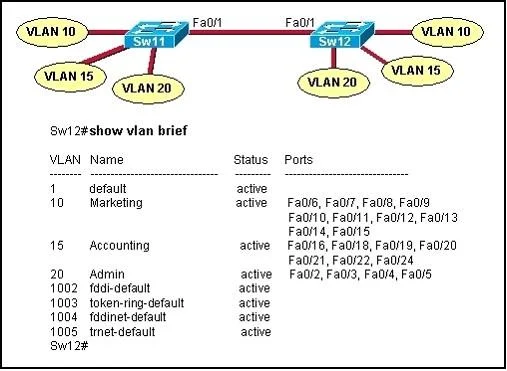
Options
- AThe VLAN database was not erased.
- BThe management VLAN is disabled.
- CThe running configuration should have been erased.
- DThe "mode" button was not pressed when the switch was reloaded.
- EThe switch was not configured with an IP address or a default gateway.
How the community answered
(28 responses)- A82% (23)
- C11% (3)
- D4% (1)
- E4% (1)
Explanation
On a Cisco Catalyst 2950 (and most Catalyst switches), the VLAN database is stored in a separate file called vlan.dat in flash memory - it is NOT part of the startup configuration. When the administrator erased the startup config and reloaded the switch, the previous department's custom VLAN assignments were preserved in vlan.dat. As a result, switch ports may still belong to old VLANs that no longer match the intended network design, causing connectivity problems for the newly connected PCs. To fully reset a Catalyst switch, you must also delete the VLAN database using the command 'delete flash:vlan.dat' before reloading.
Topics
Community Discussion
No community discussion yet for this question.