
1Z0-997-20 · Question #79
You have designed and deployed your Autonomous Data Warehouse (ADW) such that it is accessible from your on-premises data center and servers running on both private and public networks in Oracle…
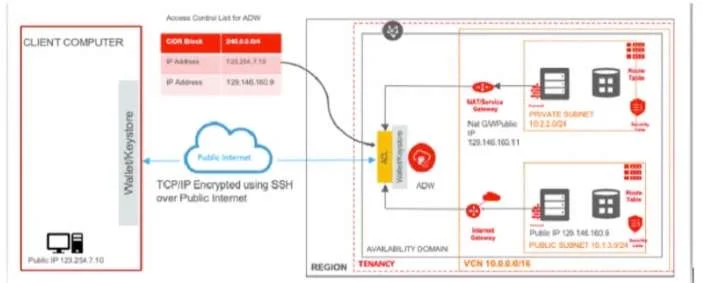
The correct answer is B. Add an entry in the route table (associated with the private subnet) with destination of 0.0.0.0/. There are 3 connections to ADW 1- Connecting to (ADW) from Public Internet 2- Connecting to ADW (via NAT or Service Gateway) from a server running on a private subnet in OCI (in the same tenancy) 3- Connecting to ADW (via internet Gateway) from a server running on a public…
Question
You have designed and deployed your Autonomous Data Warehouse (ADW) such that it is accessible from your on-premises data center and servers running on both private and public networks in Oracle Cloud Infrastructure (OCI). As you are testing the connectivity to your ADW database from the different access paths, you notice that the server running on the private network is unable to connect to ADW. Which two steps do you need to take to enable connectivity from the server on the private network to ADW? (Choose two.)
Exhibit
Options
- AAdd an entry in the Security List of the ADW allowing ingress traffic for C10R block 10.2.2.0/24.
- BAdd an entry in the route table (associated with the private subnet) with destination of 0.0.0.0/:
- CAdd an entry in the access table list of ASW for CIDR block 10.2.2.0/24.
- DAdd an entry in the route table (associated with the private subnet) with destination of 0.0.0.0./0;
How the community answered
(20 responses)- A15% (3)
- B75% (15)
- C5% (1)
- D5% (1)
Explanation
There are 3 connections to ADW 1- Connecting to (ADW) from Public Internet 2- Connecting to ADW (via NAT or Service Gateway) from a server running on a private subnet in OCI (in the same tenancy) 3- Connecting to ADW (via internet Gateway) from a server running on a public subnet in OCI (in the same tenancy
Topics
Community Discussion
No community discussion yet for this question.