
1Z0-908 · Question #53
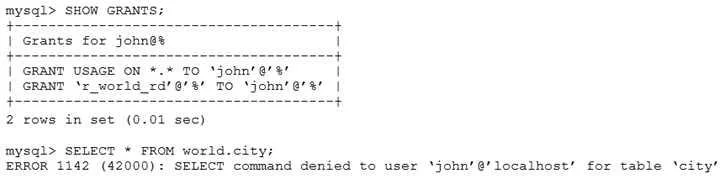
Examine these statements, which execute successfully: CREATE ROLE r_world_rd; GRANT SELECT ON world.* TO r_world_rd; CREATE USER john IDENTIFIED BY `P@ssw0rd'; GRANT r_world_rd TO john; Examine…
The correct answer is B. John has not activated the role. In MySQL 8.0+, roles granted to a user are not active by default upon login. John must explicitly activate the role in his session with SET ROLE r_world_rd; or SET ROLE ALL;, or the DBA must configure it as a default with SET DEFAULT ROLE r_world_rd TO john; - until then…
Question
Examine these statements, which execute successfully:
CREATE ROLE r_world_rd; GRANT SELECT ON world.* TO r_world_rd; CREATE USER john IDENTIFIED BY `P@ssw0rd'; GRANT r_world_rd TO john; Examine these statements issued by user John:
What is the reason for the error?
Exhibit
Options
- AThe statement was blocked by MySQL Firewall.
- BJohn has not activated the role.
- CJohn needs to reconnect to the database.
- DThe DBA needs to execute FLUSH PRIVILEGES.
How the community answered
(39 responses)- A15% (6)
- B77% (30)
- C3% (1)
- D5% (2)
Explanation
In MySQL 8.0+, roles granted to a user are not active by default upon login. John must explicitly activate the role in his session with SET ROLE r_world_rd; or SET ROLE ALL;, or the DBA must configure it as a default with SET DEFAULT ROLE r_world_rd TO john; - until then, John's SELECT attempt on the world schema will fail with an access denied error even though the role was granted.
Why the distractors are wrong:
- A - MySQL Firewall is an enterprise plugin that blocks based on query patterns; nothing in the setup indicates it's configured or involved.
- C - Reconnecting alone won't help because roles still don't auto-activate on a new connection unless a default role has been configured first.
- D -
FLUSH PRIVILEGESis only needed when grant tables are modified directly (e.g.,INSERT INTO mysql.user); usingGRANTstatements reloads privileges automatically, so this is a no-op here.
Memory tip: Think of a MySQL role like a badge you've been issued but must badge in to use - GRANT hands you the badge, but SET ROLE (or SET DEFAULT ROLE) is the tap that activates it.
Topics
Community Discussion
No community discussion yet for this question.