
Oracle
1Z0-877 · Question #138
Given these settings on your x86-based server: You connected a console to the serial port (COM1) and you want to setup your server so that it uses the console that you connected. Which describes how…
Sign in or unlock 1Z0-877 to reveal the answer and full explanation for question #138. The question stem and answer options stay visible for context.
Question
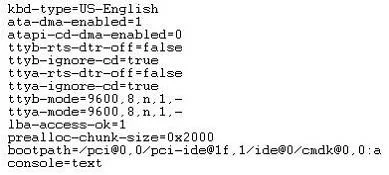
Given these settings on your x86-based server:
You connected a console to the serial port (COM1) and you want to setup your server so that it uses the console that you connected. Which describes how to make the system recognize the console for bootup and not the VGA monitor and keyboard?
Exhibit
Options
- ASet the console property to ttya as follows: kernel /platform/i86pc/multiboot -B console=ttya
- BThe x86 platform does not support booting from a serial port.
- CSelect to boot from the Solaris Serial Console ttya in the GRUB menu.
- DChange the PROM settings so that kbd-type=serial, ttya-mode matches the port settings for the
- ENo changes to the PROM are required. Shutdown the system and disconnect the VGA monitor
Unlock 1Z0-877 to see the answer
You've previewed enough free 1Z0-877 questions. Unlock 1Z0-877 for full answers, explanations, the timed quiz mode, progress tracking, and the master PDF. Question stem and options stay visible so you can still see what's on the exam.