
1Z0-822 · Question #141
Your company has set a policy that all Oracle Solaris 11 instances must have a backup boot environment created whenever software packages are added, removed, or updated. The current boot environment…
Sign in or unlock 1Z0-822 to reveal the answer and full explanation for question #141. The question stem and answer options stay visible for context.
Question
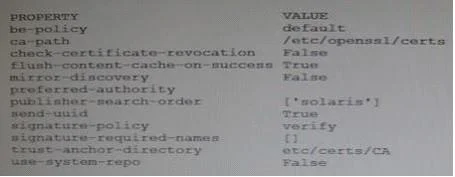
Your company has set a policy that all Oracle Solaris 11 instances must have a backup boot environment created whenever software packages are added, removed, or updated. The current boot environment must not be modified. The backup boot environment must represent the system image before the procedure and the new boot environment must represent the image before the procedure. The image properties on your system are as follows:
You are instructed to install the top utility. Which two will allow the top package to be installed on the system while adhering to the company policy?
Exhibit
Options
- Apkg property pkg-install=backup-bepkg install top
- Bpkg set-property be-policy create-backuppkg install top
- Cpkg install --be-name BE2 top
- Dpkg set-property be-policy always-newpkg install top
- Epkg set-property create-backup truepkg install top
Unlock 1Z0-822 to see the answer
You've previewed enough free 1Z0-822 questions. Unlock 1Z0-822 for full answers, explanations, the timed quiz mode, progress tracking, and the master PDF. Question stem and options stay visible so you can still see what's on the exam.