
Oracle
1Z0-821 · Question #46
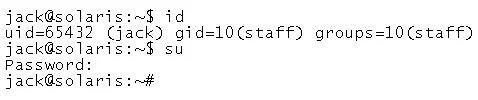
You are logged in to a Solaris 11 system as user jack. You issue the following sequence of commands: Identify two correct statements.
Sign in or unlock 1Z0-821 to reveal the answer and full explanation for question #46. The question stem and answer options stay visible for context.
Administering User Accounts
Question
You are logged in to a Solaris 11 system as user jack. You issue the following sequence of commands:
Identify two correct statements.
Exhibit
Options
- AYou have the effective privilege of the account root.
- BYour GID is 10.
- CYour home directory is /root.
- DYou are running the shell specified for the account root.
- EYour UID is 1.
Unlock 1Z0-821 to see the answer
You've previewed enough free 1Z0-821 questions. Unlock 1Z0-821 for full answers, explanations, the timed quiz mode, progress tracking, and the master PDF. Question stem and options stay visible so you can still see what's on the exam.
Topics
#su command#effective privileges#UID GID#user switching