
Oracle
1Z0-821 · Question #204
The core dump configuration in your non global zone is A user is running a process in a non-global zone (testzone) and the process crashes. The process information is…
Sign in or unlock 1Z0-821 to reveal the answer and full explanation for question #204. The question stem and answer options stay visible for context.
Analyzing and Troubleshooting System Problems
Question
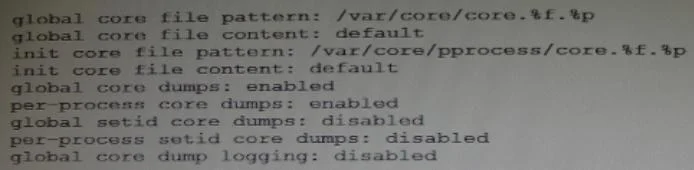
The core dump configuration in your non global zone is A user is running a process in a non-global zone (testzone) and the process crashes. The process information is:
user126632618017:46:42pts/20:00/usr/bin/bash When the user's process crashes in testzone, a non-global zone, where will the core dump be saved?
Exhibit
Options
- AThe file will be stored in the non-global zone's directory: /var/core/pprocess/core.hash.2663.
- BThe file will be saved in the global zone's directory: /var/core/core.bash.2663.
- CA core file cannot be generated in a non-global zone because it shares the kernel with the global
- DThe file will be stored in the global zone's directory: /var/core/pprocess/core.bash.2663.
- EThe file will be saved in non-global zone's directory: /var/core/core.bash.2663
Unlock 1Z0-821 to see the answer
You've previewed enough free 1Z0-821 questions. Unlock 1Z0-821 for full answers, explanations, the timed quiz mode, progress tracking, and the master PDF. Question stem and options stay visible so you can still see what's on the exam.
Topics
#core dumps#non-global zones#coreadm#zone processes