
Oracle
1Z0-804 · Question #149
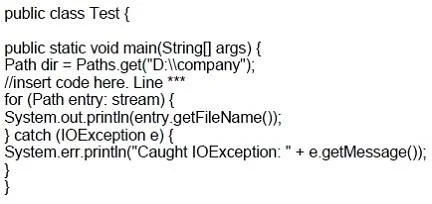
Given the code fragment: Which two try statements, when inserted at line ***, enable you to print files with the extensions.java, .htm, and.jar.
Sign in or unlock 1Z0-804 to reveal the answer and full explanation for question #149. The question stem and answer options stay visible for context.
NIO.2
Question
Given the code fragment:
Which two try statements, when inserted at line ***, enable you to print files with the extensions.java, .htm, and.jar.
Exhibit
Options
- Atry (DirectoryStream<Path> stream = Files.newDirectoryStream(dir,"*.{java,htm,jar}")){
- Btry (DirectoryStream<Path> stream = Files.newDirectoryStream(dir,"*. [java,htm,jar]")) {
- Ctry (DirectoryStream<Path> stream = Files.newDirectoryStream(dir,".{java,htm*,jar*}")) {
- Dtry (DirectoryStream<Path> stream = Files.newDirectoryStream(dir,"**.{java,htm,jar}")) {
Unlock 1Z0-804 to see the answer
You've previewed enough free 1Z0-804 questions. Unlock 1Z0-804 for full answers, explanations, the timed quiz mode, progress tracking, and the master PDF. Question stem and options stay visible so you can still see what's on the exam.
Topics
#DirectoryStream#glob patterns#file filtering#path matching