
1Z0-591 · Question #67
Point-and-click generation of case statement logic can be accessed via which option?
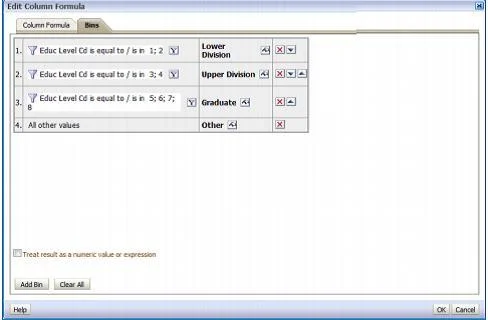
The correct answer is A. Column Formula -> Bins tab. The "Edit Column Formula" dialog box has a second, very tiny tab called, "Bins." You can use this tab to have OBIEE build a CASE statement for you in a formula (you can also create a CASE statement yourself by using one of the functions that appears under "Expressions" if you…
Question
Point-and-click generation of case statement logic can be accessed via which option?
Exhibit
Options
- AColumn Formula -> Bins tab
- BCompound Layout
- CColumn Properties -> Conditional Format tab
- DAdvanced Tab
- ESubject Area metrics
How the community answered
(21 responses)- A71% (15)
- B5% (1)
- C14% (3)
- E10% (2)
Explanation
The "Edit Column Formula" dialog box has a second, very tiny tab called, "Bins." You can use this tab to have OBIEE build a CASE statement for you in a formula (you can also create a CASE statement yourself by using one of the functions that appears under "Expressions" if you want). A CASE statement is a lot like an IF-THEN-ELSE statement, except that it's a little easier to read when you have multiple options. Basically, it puts values in different buckets that you define.
Topics
Community Discussion
No community discussion yet for this question.