
Oracle
1Z0-580 · Question #7
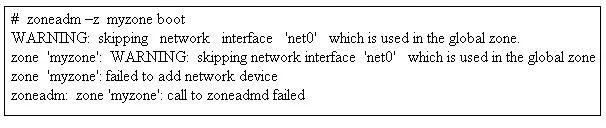
A zone fails to boot, and zoneadm produces the following message: Which two approaches might resolve the problem and enable the zone to boot?
Sign in or unlock 1Z0-580 to reveal the answer and full explanation for question #7. The question stem and answer options stay visible for context.
Network Configuration
Question
A zone fails to boot, and zoneadm produces the following message:
Which two approaches might resolve the problem and enable the zone to boot?
Exhibit
Options
- AChange the network link, that will be used by that zone.
- BUse "dladm disable net0" in the global zone to bring the NIC net0 down.
- CConvert the zone to use shared-IP networking.
- DUse "dladm rename-link net0 net9" in the global zone.
- EUse "netconfig disable net0" in the global zone.
Unlock 1Z0-580 to see the answer
You've previewed enough free 1Z0-580 questions. Unlock 1Z0-580 for full answers, explanations, the timed quiz mode, progress tracking, and the master PDF. Question stem and options stay visible so you can still see what's on the exam.
Topics
#zone networking#exclusive-IP#shared-IP#dladm