1Z0-497 · Question #27
Your customer has two CDBs: one for Production and one for development. You are asked to create a new development PDB (salesdev) from an existing production PDB (salesprd). Which two options would…
The correct answer is C. You alter the salesprd source database to open in read-only mode: D. Connected as the salesprd local DBA, you create an XML using. D: This method not exactly copying the Prod PDB to dev PDB, rather it will move prod as dev, as we are unplugging prod it will not be available in the prod CDB. If needed back we need to plug the prod PDB back into prod CDB. Also dev pdb must be created using COPY method and…
Question
Your customer has two CDBs: one for Production and one for development. You are asked to create a new development PDB (salesdev) from an existing production PDB (salesprd). Which two options would accomplish this?
Exhibit
Options
- AYou copy all the PDBSSEEDdata files from the production CDB into the development CDB and
- BYou alter the salesprd source database to open in read-only mode, and start cloning the source
- CYou alter the salesprd source database to open in read-only mode:
- DConnected as the salesprd local DBA, you create an XML using:
How the community answered
(21 responses)- A19% (4)
- B10% (2)
- C71% (15)
Explanation
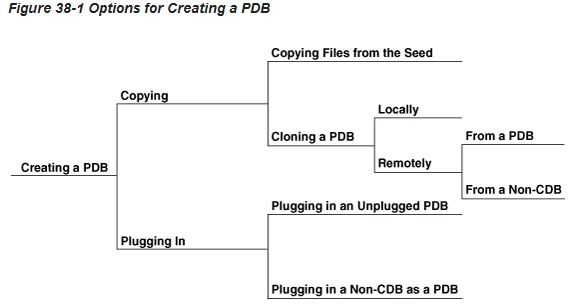
D: This method not exactly copying the Prod PDB to dev PDB, rather it will move prod as dev, as we are unplugging prod it will not be available in the prod CDB. If needed back we need to plug the prod PDB back into prod CDB. Also dev pdb must be created using COPY method and not using NOCOPY or MOVE. You can create a pluggable database (PDB) in a multitenant container database (CDB) in the - Create the new PDB by using the seed. Create a PDB in a CDB using the files of the seed. This technique copies the files associated with the seed to a new location and associates the copied files with the new PDB. "Creating a PDB Using the Seed" - Create the new PDB by cloning an existing PDB or non-CDB. Create a PDB by cloning a source PDB or non-CDB and plugging the clone into the CDB. A source can be a PDB in the local CDB, a PDB in a remote CDB, or a non-CDB. This technique copies the files associated with the source to a new location and associates the copied files with "Creating a PDB by Cloning an Existing PDB or Non-CDB" - Plug an unplugged PDB into a CDB. Create a PDB by using the XML metadata file that describes the PDB and the files associated with the PDB to plug it into the CDB. "Creating a PDB by Plugging an Unplugged PDB into a CDB" - Create the new PDB by using a non-CDB. Create a PDB by moving a non-CDB into a PDB. You can use the DBMS_PDB.DESCRIBE package to create an unplugged PDB from an Oracle Database 12c non-CDB. You can then plug the unplugged PDB into the CDB. "Creating a PDB Using a Non-CDB" You can remove a PDB from a CDB in the following ways: - Unplug the PDB from a CDB.
Topics
Community Discussion
No community discussion yet for this question.
