
1Z0-497 · Question #20
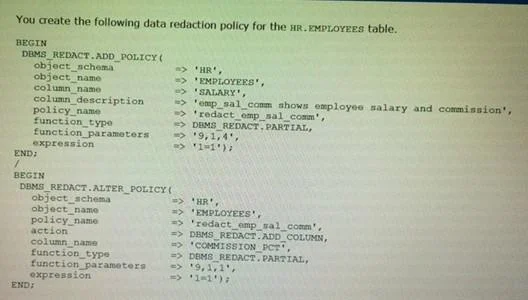
Which two statements about this policy are true?
The correct answer is A. It replaces the first four digits of the value from the SALARY column with the number 9. C. It replaces the first digit of the value from the COMMISSION_PCTcolumn with 9. https://docs.oracle.com/database/121/ASOAG/redaction_config.htm#ASOAG816 The settings are as follows: 1.Input format: Defines how the data is currently formatted. Enter V for each character that potentially can be redacted, such as all of the digits in a credit card number…
Question
Which two statements about this policy are true?
Exhibit
Options
- AIt replaces the first four digits of the value from the SALARY column with the number 9.
- BIt replaces the first digit of the value from the SALARY column with the number 4.
- CIt replaces the first digit of the value from the COMMISSION_PCTcolumn with 9.
- DIt replaces the first nine digits of the value from the COMMISSION_PCTcolumn with 1.
- EIt uses the full data redaction method.
- FIt uses the random redaction method.
How the community answered
(24 responses)- A79% (19)
- B4% (1)
- D13% (3)
- E4% (1)
Explanation
https://docs.oracle.com/database/121/ASOAG/redaction_config.htm#ASOAG816 The settings are as follows: 1.Input format: Defines how the data is currently formatted. Enter V for each character that potentially can be redacted, such as all of the digits in a credit card number. Enter F for each character that you want to format using a formatting character, such as hyphens or blank spaces in the credit card number. Ensure that each character has a corresponding V or F value. (The input format values are not case-sensitive.) 2.Output format: Defines how the displayed data should be formatted. Enter V for each character to be potentially redacted. Replace each F character in the input format with the character that you want to use for the displayed output, such as a hyphen. (The output format values are not case-sensitive.) 3.Mask character: Specifies the character to be used for the redaction. Enter a single character to use for the redaction, such as an asterisk (). 4.Starting digit position: Specifies the starting V digit position for the redaction. 5.Ending digit position: Specifies the ending V digit position for the redaction. Do not include the F positions when you decide on the ending position value. For example, the following setting redacts the first 12 V digits of the credit card number 5105 1051 0510 5100, and replaces the F positions (which are blank spaces) Input: 5105 1051 0510 5100 function_parameters => 'VVVVFVVVVFVVVVFVVVV,VVVV-VVVV-VVVV- Output: --***-4320 Partial Fixed Character Redaction Formats
Topics
Community Discussion
No community discussion yet for this question.