
1Z0-460 · Question #37
Which two options can be completed when using the Firewall Configuration Tool, system - config - firewall?
The correct answer is B. Enabling or disabling the firewall entirely C. Build a filter to obfuscate sensitive data (national ID numbers, Credit Cards, and so on). system-config-firewall The GUI screen to control the firewall is available from the menu (System > Administration > Firewall) or can be started from the command line using the system-config-firewall command. Once started, the toolbar provides buttons to allow the firewall to be…
Question
Which two options can be completed when using the Firewall Configuration Tool, system - config
- firewall?
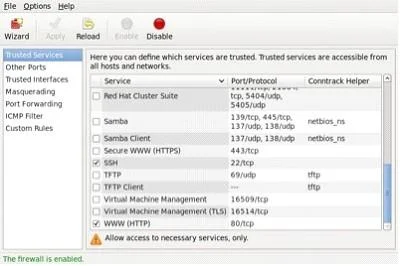
Exhibit
Options
- AWrite complex firewall rules for checking, logging, and rejecting inbound and outbound
- BEnabling or disabling the firewall entirely
- CBuild a filter to obfuscate sensitive data (national ID numbers, Credit Cards, and so on)
- DSelect the services that have access to the network resource
How the community answered
(32 responses)- A6% (2)
- B84% (27)
- D9% (3)
Explanation
system-config-firewall The GUI screen to control the firewall is available from the menu (System > Administration > Firewall) or can be started from the command line using the system-config-firewall command. Once started, the toolbar provides buttons to allow the firewall to be enabled/disabled(B). You can also configure basic trusted services, such as SSH, FTP and HTTP(C), by putting a tick in the appropriate checkbox and clicking the "Apply" button on the toolbar. Firewall GUI - Trusted Services The "Other Ports" section allows you to open ports that are not covered in the "Trusted Services"
Topics
Community Discussion
No community discussion yet for this question.