
1Z0-450 · Question #3
Which three actions are performed in the detail pane of the Object Browser?
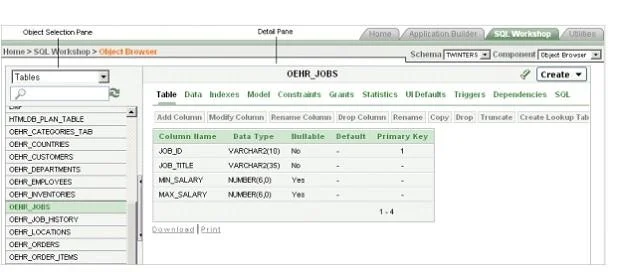
The correct answer is A. Enable and disable constraints B. View the model of a selected table along with all related tables E. Create UI defaults. Displays a list of constraints for the current table. Actions you can perform include Create, Drop, Enable, and Disable. Displays a graphical representation of the selected table along with all related tables. Related tables are those that reference the current table in a…
Question
Which three actions are performed in the detail pane of the Object Browser?
Exhibit
Options
- AEnable and disable constraints
- BView the model of a selected table along with all related tables
- CWrite an SQL statement to update data in a table
- DRestore dropped database objects
- ECreate UI defaults
How the community answered
(56 responses)- A84% (47)
- C5% (3)
- D11% (6)
Explanation
Displays a list of constraints for the current table. Actions you can perform include Create, Drop, Enable, and Disable. Displays a graphical representation of the selected table along with all related tables. Related tables are those that reference the current table in a foreign key and those tables referenced by foreign keys within the current table. Displays user interface defaults for forms and reports. User interface defaults enable developers to assign default user interface properties to a table, column, or view within a specified schema. Click Edit to edit defined user interface defaults. Click Create to initialize user interface defaults for tables that do not currently have user interface defaults defined. See the screenshot below: Note: The Object Browser page is divided into two sections: * Object Selection pane displays on the left side of the Object Browser page and lists database objects of a selected type within the current schema. You can further narrow the results by filtering on the object name. * Detail pane displays to the right of the page and displays detailed information about the selected object. To view object details, select an object in the Object Selection pane. Click the tabs at the top of the Detail pane to view additional details about the current object. To edit an object, click the appropriate button.
Topics
Community Discussion
No community discussion yet for this question.