
Oracle
1Z0-409 · Question #3
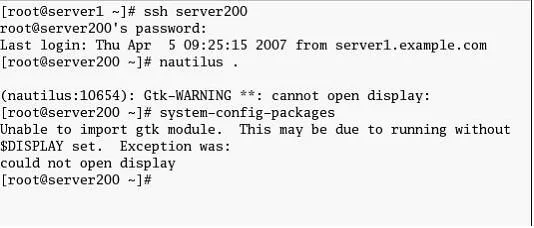
View the Exhibit. The root user at server1 has connected to server200 using ssh. While trying to execute remote graphical applications he receives an error as shown in the Exhibit. What could be the…
The correct answer is A. Use the -X option with ssh while connecting. D. Set the X11Forwarding parameter to yes in /etc/ssh/sshd_config. See the full explanation below for the reasoning.
Question
View the Exhibit. The root user at server1 has connected to server200 using ssh. While trying to execute remote graphical applications he receives an error as shown in the Exhibit. What could be the possible solution to get rid of this error and run remote graphical applications safely through ssh? (Choose all that apply.)
Exhibit
Options
- AUse the -X option with ssh while connecting.
- BRemove the ~/.Xauthority file on both server1 and server200.
- CSet the XAuthLocation parameter correctly in /etc/ssh/ssh_config.
- DSet the X11Forwarding parameter to yes in /etc/ssh/sshd_config.
How the community answered
(38 responses)- A84% (32)
- B5% (2)
- C11% (4)
Community Discussion
No community discussion yet for this question.