
1Z0-408 · Question #68
You are defining an income statement report. You want to allow viewers of the report to be able to drill down from report balances to the underlying transactions. What do you need to enable?
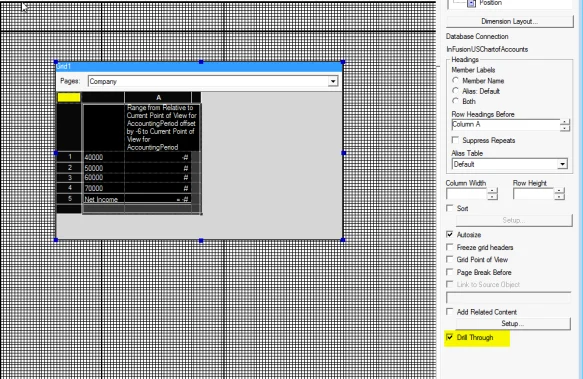
The correct answer is A. Drill Through in Grid Properties. Bring up Grid Properties, and check the box (bottom right) to enable Drill Through. Report users gain visibility into detailed information easily and efficiently by simply drilling on parent level account balances to lower level balances, and even to underlying journals and…
Question
You are defining an income statement report. You want to allow viewers of the report to be able to drill down from report balances to the underlying transactions. What do you need to enable?
Exhibit
Options
- ADrill Through in Grid Properties
- BReport Functions
- CNothing. All report balances are drillablein allFRStudio reports.
- DAllow Expansion
How the community answered
(62 responses)- A79% (49)
- B3% (2)
- C11% (7)
- D6% (4)
Explanation
Bring up Grid Properties, and check the box (bottom right) to enable Drill Through. Report users gain visibility into detailed information easily and efficiently by simply drilling on parent level account balances to lower level balances, and even to underlying journals and subledger details to view the details that make up the balance. Without this feature, this supporting information would have to be looked up manually.
Topics
Community Discussion
No community discussion yet for this question.