
Oracle
1Z0-403 · Question #45
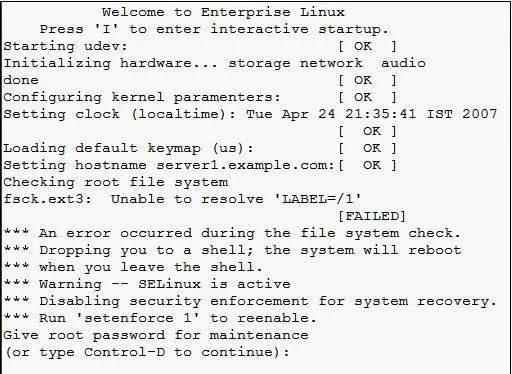
View the Exhibit. On an Oracle Enterprise Linux system, upon booting, you got an error message as shown in the Exhibit. Which minimal steps would you take to fix this issue and boot the system…
The correct answer is D. Enter the root password and remount the root filesystem / in read/write mode. E. Identify the correct label for the root filesystem using the blkid or the e2label command. F. Change the LABEL=/1 entry with the original label of root filesystem / in the /etc/fstab file. See the full explanation below for the reasoning.
Question
View the Exhibit. On an Oracle Enterprise Linux system, upon booting, you got an error message as shown in the Exhibit. Which minimal steps would you take to fix this issue and boot the system successfully? (Choose all that apply.)
Exhibit
Options
- ARun e2fsck on root filesystem / after issuing the root password.
- BSet Security Enhanced Linux (SELinux) on the system to permissive mode.
- CReplace fs_freq and fs_passno in the /etc/fstab file with the value 0.
- DEnter the root password and remount the root filesystem / in read/write mode.
- EIdentify the correct label for the root filesystem using the blkid or the e2label command.
- FChange the LABEL=/1 entry with the original label of root filesystem / in the /etc/fstab file.
How the community answered
(30 responses)- A17% (5)
- B7% (2)
- C3% (1)
- D73% (22)
Community Discussion
No community discussion yet for this question.