
1Z0-160 · Question #52
You use GUI tools on the Virtual Machine to create and administer the Database as a Service (DBaaS) databases. You wish to use the Oracle Database Configuration Assistant (DBCA) to create a database…
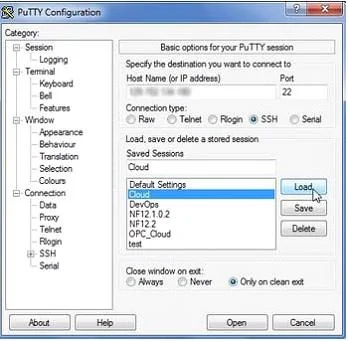
The correct answer is A. Connect to the DBaaS instance with the SSH terminal session as the oracle user. B. Configure a PuTTY or SSH session to perform X11 forwarding. Example: To create a database into your Oracle Database Cloud Service 1. You have created a PuTTY definition for connecting through an SSH tunnel to your Database Cloud Service (DBaaS) instance. Now open this definition to connect to the VM. 2. Because this is not the first…
Question
You use GUI tools on the Virtual Machine to create and administer the Database as a Service (DBaaS) databases. You wish to use the Oracle Database Configuration Assistant (DBCA) to create a database instance. To run DBCA, you will need to use an SSH connection. You need to perform several steps to establish this connection in DBCA and to create the database. What are two of these steps?
Exhibit
Options
- AConnect to the DBaaS instance with the SSH terminal session as the oracle user.
- BConfigure a PuTTY or SSH session to perform X11 forwarding.
- CInstall an Xterminal program if required.
- DUpdate the tnsnames.ora file with the name of the service to which you want to connect.
How the community answered
(45 responses)- A78% (35)
- C16% (7)
- D7% (3)
Explanation
Example: To create a database into your Oracle Database Cloud Service 1. You have created a PuTTY definition for connecting through an SSH tunnel to your Database Cloud Service (DBaaS) instance. Now open this definition to connect to the VM. 2. Because this is not the first time you are connecting to the VM, the SSH utility does not prompt you to confirm the public key. If it were the first time, the SSH utility would have prompted you to confirm the public key. You would have confirmed by clicking Yes. 3. You can now launch DBCA either in silent mode or in graphical mode. ATools/UsingDBATools.html
Topics
Community Discussion
No community discussion yet for this question.