nerdexam
Oracle

1Z0-151 · Question #83

You are planning the alerts that are needed for your Human Resources application. You wish to display the following in alerts: A message to inform the user about being at the just record A warning…

The correct answer is D. On Note style alert, one Caution style alert, and one Stop style alert. In this scenario we need three different kind of alerts. How to Create an Alert Like other objects you create at design-time, alerts are created from the Object Navigator. 1. Select the Alerts node in the Navigator, and then select Create. 2. Define the properties of the alert…

Working with Alerts

Question

You are planning the alerts that are needed for your Human Resources application. You wish to display the following in alerts:

  • A message to inform the user about being at the just record
  • A warning about a potential conflict with the data just entered
  • A message to display a validation error to the user
  • A warning that the salary is out of range and that asks whether the

user wants to correct it You want the note symbol ( ) to appear on alerts that display only informative messages, the warning symbol to appear on messages where you will allow the user to continue despite some data problem, and the alarm boll symbol to appear where the user will not be allowed to continue without correcting the situation that caused the alert to be displayed. You want to define the minimum number of alerts possible and customize them at run time. Which alerts should you define?

Exhibit
1Z0-151 question #83 exhibit

Options

  • AOne Note style alert and caution style alert
  • BOne Note style alert and one Stop style alert
  • COn Caution style alert and one stop style alert
  • DOn Note style alert, one Caution style alert, and one Stop style alert
  • ETwo Caution style alerts and one Stop style alert

How the community answered

(48 responses)
  • A
    10% (5)
  • B
    2% (1)
  • C
    4% (2)
  • D
    81% (39)
  • E
    2% (1)

Explanation

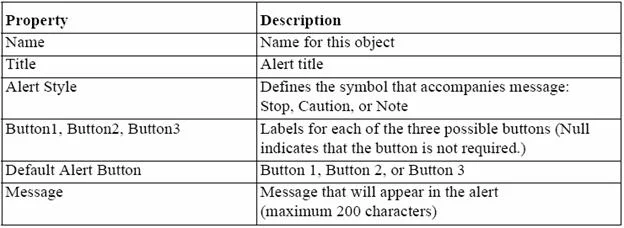
In this scenario we need three different kind of alerts. How to Create an Alert Like other objects you create at design-time, alerts are created from the Object Navigator. 1. Select the Alerts node in the Navigator, and then select Create. 2. Define the properties of the alert in the Property Palette. Here are the properties that are specific to an alert. This is an abridged list. Note: Alerts are an alternative method for communicating with the operator. Because they display in a modal window, alerts provide an effective way of drawing attention and forcing the operator to answer the message before processing can continue. Note 2: Potentially, you can create an alert for every separate alert message that you need to display, but this is usually unnecessary. You can define a message for an alert at run time, before it is displayed to the operator. This means that a single alert can be used for displaying many messages, providing that the available buttons are suitable for responding to each of these messages. Create an alert for each combination of: * Alert style required * Set of available buttons (and labels) for operator response For example, an application might require one Note-style alert with a single button (OK) for acknowledgment, one Caution alert with a similar button, and two Stop alerts that each provide a different combination of buttons for a reply. You can then assign a message to the appropriate alert before its display, through the SET_ ALERT_PROPERTY built-in procedure.

Topics

#alert styles#Note alert#Caution alert#Stop alert

Community Discussion

No community discussion yet for this question.

Full 1Z0-151 Practice