
1Z0-151 · Question #19
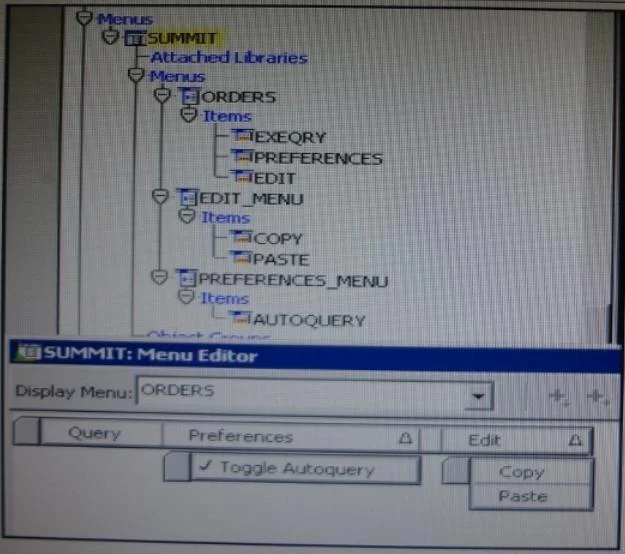
View the Exhibit. The Summit menu is attached to the Orders form. The Toggle Autoquery menu item is a check box that toggles whether a query is automatically performed when the Orders form is first…
Sign in or unlock 1Z0-151 to reveal the answer and full explanation for question #19. The question stem and answer options stay visible for context.
Question
View the Exhibit. The Summit menu is attached to the Orders form. The Toggle Autoquery menu item is a check box that toggles whether a query is automatically performed when the Orders form is first invoked. If the check box is deselected, users must manually query. In addition to using the menu, users want to be able to toggle the autoquery preference directly from the form. You add a button named Toggle Autoquery with the following When-Button- Pressed trigger:
DECLARE mi_id MENUITEMS; BEGIN mi_id ;=FIND_ITEM ('Preferences.AutoQuery') /* Determine the current checked static of the AutoCommit menu checkbox item And toggle the checked state*/ IF GET_ITEM_PROPERTY (mi_id, CHECKED) = 'TRUE' THEN SET_ITEM_PROPERTY (mi_id, CHECKED, PROPERTY_FALSE); ELSE SET_ITEM_PROPERTY (mi_id, CHECKED, PROPERTY_TRUE); END IF; END; However, the trigger does not compile. What three changes must you make so that the trigger compiles successfully?
Exhibit
Options
- AChange FIND_ITEM to FIND_MENU_ITEM.
- BChange 'preferences.AutoQuery' to 'orders.preferences.AutoQuery'.
- CChange 'preferences.AutoQuery' to 'AutoQuery'.
- DChange 'preferences.AutoQuery' to 'ORDERS.PREFERENCES>AUTOQUERY'.
- EChange 'preferences.AutoQuery' to 'AUTOQUERY'.
- FChange GET_ITEM_PROPERTY to GET_MENU_ITEM_PROPERTY
- GChange SET_ITEM_PROPERTY to SET_MENU_ITEM_PROPERTY
- HChange PROPERTY_FALSE to 'FALSE'.
Unlock 1Z0-151 to see the answer
You've previewed enough free 1Z0-151 questions. Unlock 1Z0-151 for full answers, explanations, the timed quiz mode, progress tracking, and the master PDF. Question stem and options stay visible so you can still see what's on the exam.