
1Z0-141 · Question #90
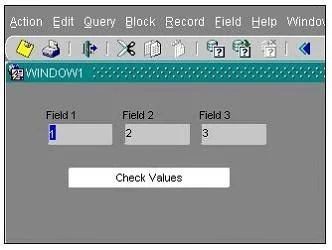
View the Exhibit to examine the form. The text items (Field1, Field2, and Field3) and the button (Check_Values) are in the CONTROL block. The Mouse Navigate property of the button has been set to…
Sign in or unlock 1Z0-141 to reveal the answer and full explanation for question #90. The question stem and answer options stay visible for context.
Question
View the Exhibit to examine the form. The text items (Field1, Field2, and Field3) and the button (Check_Values) are in the CONTROL block. The Mouse Navigate property of the button has been set to No. The following code has been written in a When-Button-Pressed trigger on the Check_Values button:
MESSAGE(:field1||' - '||:SYSTEM.cursor_item|| ' - '||:SYSTEM.trigger_item); With the focus in Field1, and the values 1, 2 and 3 in the text items, what message will be displayed when the button is pressed?
Exhibit
Options
- A-4
- B1 - 2 - 3
- C1 - field1 - Check Values
- Dfield1 - 1 - Check Values
- E1 - CONTROL.FIELD1 - CONTROL.FIELD1
- F1 - CONTROL.FIELD1 - CONTROL.CHECK_VALUES
- G:field1 - :SYSTEM.cursor_item - :SYSTEM.trigger_item
Unlock 1Z0-141 to see the answer
You've previewed enough free 1Z0-141 questions. Unlock 1Z0-141 for full answers, explanations, the timed quiz mode, progress tracking, and the master PDF. Question stem and options stay visible so you can still see what's on the exam.