
1Z0-141 · Question #77
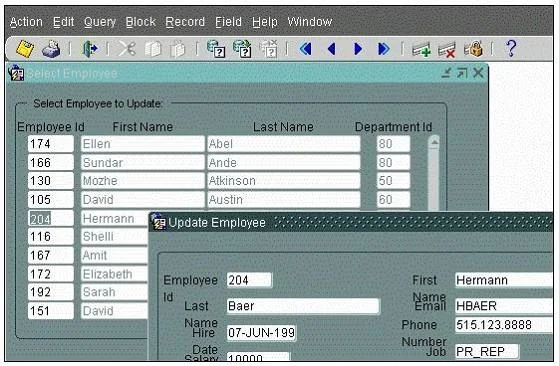
View the Exhibit. You are developing a Human Resources application. There is a query-only form that displays employee IDs, names, and department numbers. When users double-click an employee ID…
Sign in or unlock 1Z0-141 to reveal the answer and full explanation for question #77. The question stem and answer options stay visible for context.
Question
View the Exhibit. You are developing a Human Resources application. There is a query-only form that displays employee IDs, names, and department numbers. When users double-click an employee ID, another form opens displaying all the columns from the EMPLOYEES table so that users can update the records (as shown in the exhibit). You use a global variable to pass the value for Employee_Id to the update form. When users modify the name and exit the update form, how can you synchronize the data in the query-only form so that the new name is displayed?
Exhibit
Options
- ARequery the data in a When-New-Form-Instance trigger of the query-only form.
- BRequery the data in a Pre-Form trigger of the query-only form.
- CRequery the data in a When-Form-Navigate trigger of the query-only form.
- DPass the new name value in a global variable from the update form to the query-only form and
- EPass the new name value in a global variable from the update form to the query-only form and
- FPass the new name value in a global variable from the update form to the query-only form and
Unlock 1Z0-141 to see the answer
You've previewed enough free 1Z0-141 questions. Unlock 1Z0-141 for full answers, explanations, the timed quiz mode, progress tracking, and the master PDF. Question stem and options stay visible so you can still see what's on the exam.