
1Z0-141 · Question #120
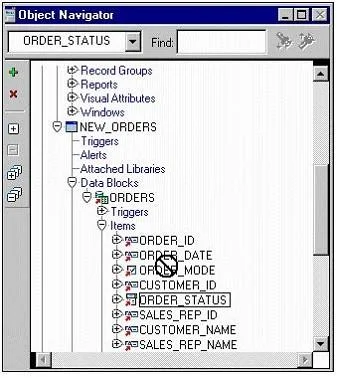
View the Exhibit. You are modifying the New_Orders form. You want to change the navigation order of the Orders block so that Order_Status is between Order_Date and Order_Mode in the navigation…
Sign in or unlock 1Z0-141 to reveal the answer and full explanation for question #120. The question stem and answer options stay visible for context.
Question
View the Exhibit. You are modifying the New_Orders form. You want to change the navigation order of the Orders block so that Order_Status is between Order_Date and Order_Mode in the navigation order. You attempt to drag the Order_Status item in the Object Navigator (as shown in the exhibit), but Forms does not allow you to release the item in the desired position. Why is this happening, and what can you do to change the navigation order?
Exhibit
Options
- ABecause the data block is subclassed, you cannot change the order of items in the object
- BBecause the data block is subclassed, you can only drag objects to a lower position in the
- CBecause the data block is subclassed, you will have to delete the object and then create it
- DBecause the item is subclassed, you cannot change any of its properties.
Unlock 1Z0-141 to see the answer
You've previewed enough free 1Z0-141 questions. Unlock 1Z0-141 for full answers, explanations, the timed quiz mode, progress tracking, and the master PDF. Question stem and options stay visible so you can still see what's on the exam.