
1Z0-1085-22 · Question #83
Which statement below is not true for Oracle Cloud infrastructure Compartments?
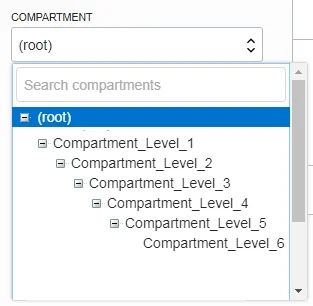
The correct answer is B. Compartments cannot be nested. When creating a compartment, you must provide a name for it (maximum 100 characters, including letters, numbers, periods, hyphens, and underscores) that is unique within its parent compartment. You must also provide a description, which is a non-unique, changeable description…
Question
Which statement below is not true for Oracle Cloud infrastructure Compartments?
Exhibit
Options
- AResources can be moved from one compartment to another
- BCompartments cannot be nested
- CEach OCI resource belongs to a single compartment
- DResources and compartments can be added and deleted anytime
How the community answered
(29 responses)- A3% (1)
- B76% (22)
- C7% (2)
- D14% (4)
Explanation
When creating a compartment, you must provide a name for it (maximum 100 characters, including letters, numbers, periods, hyphens, and underscores) that is unique within its parent compartment. You must also provide a description, which is a non-unique, changeable description for the compartment, from 1 through 400 characters. Oracle will also assign the compartment a unique ID called an Oracle Cloud ID. You can create subcompartments in compartments to create hierarchies that are six levels deep. https://docs.cloud.oracle.com/en-us/iaas/Content/Identity/Tasks/managingcompartments.htm When you first start working with Oracle Cloud Infrastructure, you need to think carefully about how you want to use compartments to organize and isolate your cloud resources. Compartments are fundamental to that process. Most resources can be moved between compartments. However, it's important to think through your compartment design for your organization up front, before implementing anything. For more information, see Setting Up Your Tenancy. The Console is designed to display your resources by compartment within the current region. When you work with your resources in the Console, you must choose which compartment to work in from a list on the page. That list is filtered to show only the compartments in the tenancy that you have permission to access. If you're an administrator, you'll have permission to view all compartments and work with any compartment's resources, but if you're a user with limited access, you probably won't. Compartments are tenancy-wide, across regions. When you create a compartment, it is available in every region that your tenancy is subscribed to. You can get a cross-region view of your resources in a specific compartment with the compartment explorer. See Viewing All Resources in a Compartment. You can create subcompartments in compartments to create hierarchies that are six levels deep. https://docs.cloud.oracle.com/en-us/iaas/Content/Identity/Tasks/managingcompartments.htm
Topics
Community Discussion
No community discussion yet for this question.