nerdexam
Oracle

1Z0-071 · Question #230

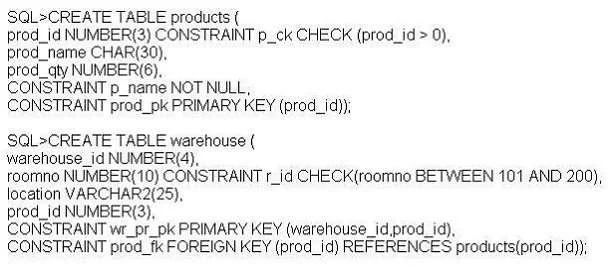
Examine the following SQL commands: Which statement is true regarding the execution of the above SQL commands?

The correct answer is B. The first CREATE TABLE command generates an error because the NULL constraint is not valid. Use TO_NUMBER on the prod_price column to convert from char to number to be able to multiply it with 0.25. Then use the TO_CHAR function (with formatting'$99,999.00') to convert the number back to char. Not C: Use the formatting'$99,999.00' with the TO_CHAR function, not with…

Using DDL Statements to Create and Manage Tables

Question

Examine the following SQL commands:

Which statement is true regarding the execution of the above SQL commands?

Exhibit
1Z0-071 question #230 exhibit

Options

  • ABoth commands execute successfully.
  • BThe first CREATE TABLE command generates an error because the NULL constraint is not valid.
  • CThe second CREATE TABLE command generates an error because the CHECK constraint is not
  • DThe first CREATE TABLE command generates an error because CHECK and PRIMARY KEY
  • EThe first CREATE TABLE command generates an error because the column PROD_ID cannot be

How the community answered

(54 responses)
  • A
    2% (1)
  • B
    83% (45)
  • C
    4% (2)
  • D
    2% (1)
  • E
    9% (5)

Explanation

Use TO_NUMBER on the prod_price column to convert from char to number to be able to multiply it with 0.25. Then use the TO_CHAR function (with formatting'$99,999.00') to convert the number back to char. Not C: Use the formatting'$99,999.00' with the TO_CHAR function, not with the TO_NUMBER - Using the TO_CHAR Function The TO_CHAR function returns an item of data type VARCHAR2. When applied to items of type NUMBER, several formatting options are available. The syntax is as follows: TO_CHAR(number1, [format], [nls_parameter]), The number1 parameter is mandatory and must be a value that either is or can be implicitly converted into a number. The optional format parameter may be used to specify numeric formatting information like width, currency symbol, the position of a decimal point, and group (or thousands) separators and must be enclosed in single - Syntax of Explicit Data Type Conversion TO_NUMBER(char1, [format mask], [nls_parameters]) = num1 TO_CHAR(num1, [format mask], [nls_parameters]) = char1 TO_DATE(char1, [format mask], [nls_parameters]) = date1 TO_CHAR(date1, [format mask], [nls_parameters]) = char1

Topics

#CREATE TABLE#NULL constraint#CHECK constraint#PRIMARY KEY

Community Discussion

No community discussion yet for this question.

Full 1Z0-071 Practice