
1Z0-062 · Question #312
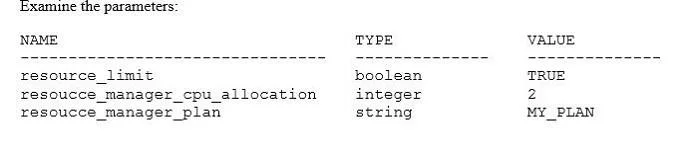
Examine the parameters: Users complain that their sessions for certain transactions hang. You investigate and discover that some users fail to complete their transactions, causing other transactions…
The correct answer is B. Decrease the SESSIONS_PER_USER limit in the profiles assigned to blocking users. C. Set a limit in the profiles of blocking users to control the number of data blocks that can be accessed in a. To prevent transaction hangs and row-level locks caused by users failing to complete transactions, one should restrict their ability to create multiple concurrent blocking sessions and limit the resources consumed by individual SQL operations.
Question
Examine the parameters:
Users complain that their sessions for certain transactions hang. You investigate and discover that some users fail to complete their transactions, causing other transactions to wait on row-level locks. Which two actions would you take to prevent this problem? (Choose two.)
Exhibit
Options
- AIncrease the maximum number of ITL slots for segments on which a blocking user performs a
- BDecrease the SESSIONS_PER_USER limit in the profiles assigned to blocking users.
- CSet a limit in the profiles of blocking users to control the number of data blocks that can be accessed in a
- DUse Database Resource Manager to automatically kill the sessions that are idle and are blocking other
- EDecrease the IDLE_TIME resource limit in the profiles assigned to blocking users.
How the community answered
(26 responses)- A12% (3)
- B69% (18)
- D15% (4)
- E4% (1)
Why each option
To prevent transaction hangs and row-level locks caused by users failing to complete transactions, one should restrict their ability to create multiple concurrent blocking sessions and limit the resources consumed by individual SQL operations.
Increasing ITL slots addresses contention for transaction entries within a data block, but it does not prevent a problematic transaction from failing to complete and holding row-level locks.
Decreasing the SESSIONS_PER_USER limit in user profiles restricts the total number of concurrent sessions a user can have, thereby reducing their overall capacity to initiate multiple transactions that could lead to blocking.
Setting a limit on resources like LOGICAL_READS_PER_CALL in user profiles directly prevents individual SQL statements within a transaction from consuming excessive resources or running indefinitely, which would hold locks and cause transactions to fail or hang.
Using Database Resource Manager to kill idle and blocking sessions is a reactive measure to address existing problems, rather than a preventative action to stop the transactions from becoming problematic in the first place.
Decreasing the IDLE_TIME resource limit only terminates sessions that become idle while holding locks; it does not address transactions that are actively running but are stuck or consuming excessive resources.
Concept tested: Oracle resource management and transaction contention prevention
Source: https://docs.oracle.com/en/database/oracle/oracle-database/21/sqlrf/CREATE-PROFILE.html
Topics
Community Discussion
No community discussion yet for this question.