
1Z0-061 · Question #309
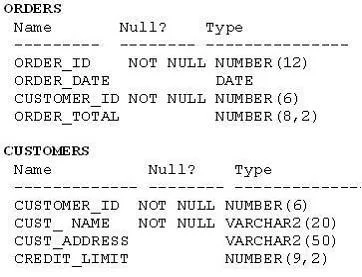
View the Exhibit and examine the structure of the ORDERS and CUSTOMERS tables. Evaluate the following SQL command: SQL> SELECT o.order_id, c.cust_name, o.order_total, c.credit_limit FROM orders o…
The correct answer is A. It locks all the rows that satisfy the condition in the statement. C. The locks are released only when a COMMIT or ROLLBACK is issued. FOR UPDATE Clause in a SELECT Statement Locks the rows in the EMPLOYEES table where job_id is SA_REP. Lock is released only when you issue a ROLLBACK or a COMMIT. If the SELECT statement attempts to lock a row that is locked by another user, the database waits until the row is…
Question
View the Exhibit and examine the structure of the ORDERS and CUSTOMERS tables. Evaluate the following SQL command:
SQL> SELECT o.order_id, c.cust_name, o.order_total, c.credit_limit FROM orders o JOIN customers c USING (customer_id) WHERE o.order_total > c.credit_limit FOR UPDATE ORDER BY o.order_id; Which two statements are true regarding the outcome of the above query? (Choose two.)
Exhibit
Options
- AIt locks all the rows that satisfy the condition in the statement.
- BIt locks only the columns that satisfy the condition in both the tables.
- CThe locks are released only when a COMMIT or ROLLBACK is issued.
- DThe locks are released after a DML statement is executed on the locked rows.
How the community answered
(20 responses)- A75% (15)
- B15% (3)
- D10% (2)
Explanation
FOR UPDATE Clause in a SELECT Statement Locks the rows in the EMPLOYEES table where job_id is SA_REP. Lock is released only when you issue a ROLLBACK or a COMMIT. If the SELECT statement attempts to lock a row that is locked by another user, the database waits until the row is available, and then returns the results of the SELECT employee_id, salary, commission_pct, job_id WHERE job_id = 'SA_REP' ORDER BY employee_id;
Topics
Community Discussion
7 Mateus R.Jun 6, 2026
FOR UPDATE works like putting a "Reserved" sign on a table at a restaurant, that sign stays up for the whole party until the check is paid or someone cancels, not just for certain chairs. So A is correct because the lock applies to every row meeting the WHERE condition (entire rows, never individual columns, which kills B), and C is correct because those row locks hold until you COMMIT or ROLLBACK, not merely because you run another DML statement against them (which rules out D).
 Wesley A.Jun 6, 2026
The restaurant analogy holds up well, but worth noting that with SELECT FOR UPDATE SKIP LOCKED, another transaction can actually seat itself at unclaimed tables while yours is still running, which trips people up when they first try to build job queues on top of this.
Wesley A.Jun 4, 2026B tripped me up first time, locks are on rows, never columns. A and C.
 Marisol N.May 21, 2026
Are the locks held on all matching rows until you commit?
Mateus R.May 24, 2026Yes, but think of it like a shopping cart at the grocery store, not a padlock on the shelf: the exclusive locks on rows you actually modified (UPDATE, DELETE) stay clamped until you commit, but the shared read locks from a plain SELECT can release early depending on your isolation level, so the honest answer is "it depends on what kind of lock and which isolation level you are running."
 Ola B.May 29, 2026
I spun this up in a sandbox and watched it myself, when you run a DML against those locked rows the lock transfers to that new statement and releases from the FOR UPDATE hold, so D makes total sense to me as one of the two correct picks. Try it in a live session with two terminals open and you will see exactly what I mean.
Mateus R.May 29, 2026Ola, think of FOR UPDATE like a velvet rope a bouncer holds on a door, nobody else can grab that rope or push through until he lets go, so a DML from another session does not steal the rope, it just stands in line and waits. That waiting behavior is why A and C are the correct picks, the lock stays with the original session and blocks other writers until that transaction commits or rolls back.