
1Z0-061 · Question #295
Examine the structure of the PROMOS table: You want to display the list of promo names with the message 'Same Day' for promos that started and ended on the same day. Which query gives the correct…
The correct answer is D. SELECT promo_name, DECODE((NULLIF(promo_start_date, promo_end_date)), NULL, 'Same. The NULLIF Function The NULLIF function tests two terms for equality. If they are equal the function returns a null, else it returns the first of the two terms tested. The NULLIF function takes two mandatory parameters of any data type. The syntax is NULLIF(ifunequal…
Question
Examine the structure of the PROMOS table:
You want to display the list of promo names with the message 'Same Day' for promos that started and ended on the same day. Which query gives the correct output?
Exhibit
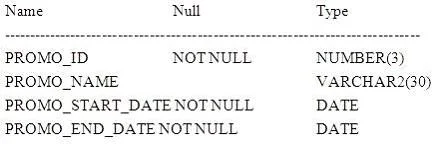
Options
- ASELECT promo_name, NVL(NULLIF(promo_start_date, promo_end_date), 'Same Day') FROM
- BSELECT promo_name, NVL(TRUNC(promo_end_date - promo_start_date), 'Same Day') FROM
- CSELECT promo_name, NVL2(TO_CHAR(TRUNC(promo_end_date-promo_start_date)), NULL,
- DSELECT promo_name, DECODE((NULLIF(promo_start_date, promo_end_date)), NULL, 'Same
How the community answered
(41 responses)- A7% (3)
- B5% (2)
- C2% (1)
- D85% (35)
Explanation
The NULLIF Function The NULLIF function tests two terms for equality. If they are equal the function returns a null, else it returns the first of the two terms tested. The NULLIF function takes two mandatory parameters of any data type. The syntax is NULLIF(ifunequal, comparison_term), where the parameters ifunequal and comparison_term are compared. If they are identical, then NULL is returned. If they differ, the ifunequal parameter is returned ANSWER A - date and String incompatibl;a datatypes for NVL function The Date The date TRUNC function performs a truncation operation on a date value based on a specified date precision format. The date TRUNC function takes one mandatory and one optional parameter. Its syntax is TRUNC(source date, [date precision format]). The source date parameter represents any value that can be implicitly converted into a date item. The date precision format parameter specifies the degree of truncation and is optional. If it is absent, the default degree of truncation is day. This means that any time component
Topics
Community Discussion
No community discussion yet for this question.