
1Z0-034 · Question #124
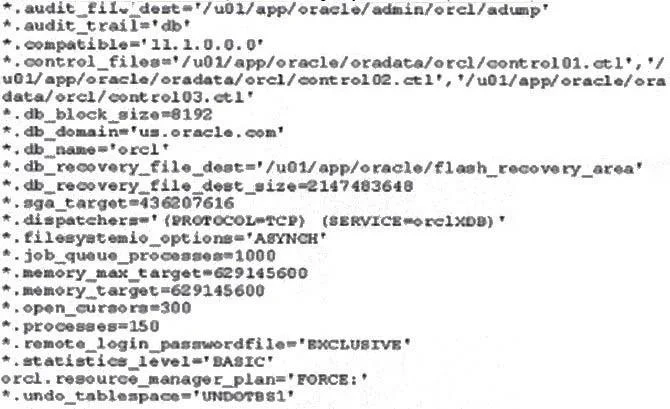
View the Exhibit and examine the parameter settings in your server-side parameter file (SPFILE). When you tried to start the database instance, you received the following error: SQL> startup…
The correct answer is B. Because the STATISTICS_LEVEL parameter is set to BASIC. Setting SGA Target Size You enable the automatic shared memory management feature by setting the SGA_TARGET parameter to an on zero value. This parameter sets the total size of the SGA. It replaces the parameters that control the memory allocated for a specific set of…
Question
View the Exhibit and examine the parameter settings in your server-side parameter file (SPFILE). When you tried to start the database instance, you received the following error:
SQL> startup ORA-00824: cannot set SGA_TARGET or MEMORY_TARGET due to existing internal settings, see alert log for more information Why did the instance fail to start?
Exhibit
Options
- ABecause the PGA_AGGREGATE_TARGET parameter is not set
- BBecause the STATISTICS_LEVEL parameter is set to BASIC
- CBecause MEMORY_TARGET and MEMORY_MAX_TARGET cannot be equal
- DBecause both the SGA_TARGET and MEMORY_TARGET parameters are set.
How the community answered
(43 responses)- A5% (2)
- B70% (30)
- C9% (4)
- D16% (7)
Explanation
Setting SGA Target Size You enable the automatic shared memory management feature by setting the SGA_TARGET parameter to an on zero value. This parameter sets the total size of the SGA. It replaces the parameters that control the memory allocated for a specific set of individual components, which are now automatically and dynamically resized (tuned) as needed. The STATISTICS_LEVEL initialization parameter must be set to TYPICAL (the default) or ALL for automatic shared memory management to function.
Topics
Community Discussion
No community discussion yet for this question.