
Oracle
1Z0-007 · Question #169
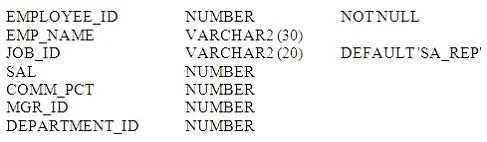
Examine the structure of the EMPLOYEES table: You need to update the records of employees 103 and 115. The UPDATE statement you specify should update the rows with the values specified below: Which…
Sign in or unlock 1Z0-007 to reveal the answer and full explanation for question #169. The question stem and answer options stay visible for context.
Manipulating Data (DML)
Question
Examine the structure of the EMPLOYEES table:
You need to update the records of employees 103 and 115. The UPDATE statement you specify should update the rows with the values specified below:
Which UPDATE statement meets the requirements?
Exhibits

Options
- AUPDATE employees
- BUPDATE employees
- CUPDATE employees
- DUPDATE employees
- EUPDATE employees
Unlock 1Z0-007 to see the answer
You've previewed enough free 1Z0-007 questions. Unlock 1Z0-007 for full answers, explanations, the timed quiz mode, progress tracking, and the master PDF. Question stem and options stay visible so you can still see what's on the exam.
Topics
#UPDATE statement#WHERE clause#DML syntax#multi-row update