
1Y0-A22 · Question #106
Scenario: A group of users with thin clients connect to a hosted desktop in XenApp and then launch their published applications from within the desktop. When users log in to their hosted desktop…
The correct answer is B. Verify that the XenApp Services site is configured with pass-through authentication. C. Apply a Group policy to the XenApp servers that uses the icaclient.ADM file and enable passthrough. See the full explanation below for the reasoning.
Question
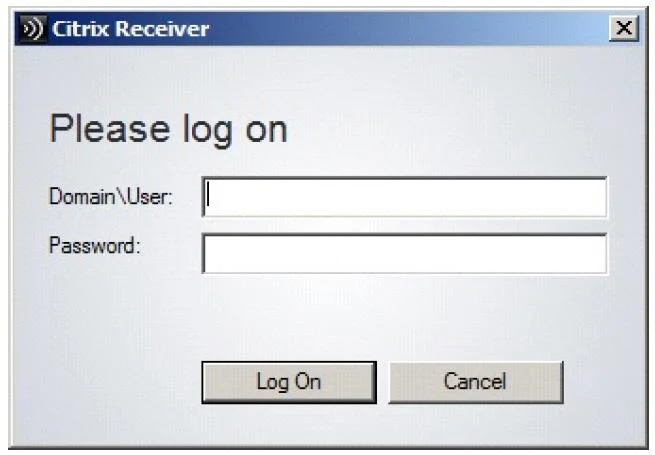
Scenario: A group of users with thin clients connect to a hosted desktop in XenApp and then launch their published applications from within the desktop. When users log in to their hosted desktop, the dialogue shown in the attached exhibit appears. Click the Exhibit button to view the attached exhibit. Which two actions should the XenApp Administrator take to resolve this problem? (Choose two.)
Exhibit
Options
- AInstall the Citrix Single sign-on agent.
- BVerify that the XenApp Services site is configured with pass-through authentication.
- CApply a Group policy to the XenApp servers that uses the icaclient.ADM file and enable passthrough
- DApply a Group policy to the user workstation that uses the icaclient.ADM file and enable passthrough
How the community answered
(46 responses)- A20% (9)
- B72% (33)
- D9% (4)
Community Discussion
7 Luis F.Jun 26, 2026
The correct answers are B and C. The dialog is prompting for credentials because pass-through authentication is not set up, so you need to configure the XenApp Services site to accept pass-through auth (B) and then push the icaclient.ADM Group Policy to the XenApp servers themselves (C) since that is where the hosted desktop and published apps are running, not on the thin client workstations.
 Ingrid P.Jun 28, 2026
That server-versus-workstation distinction for the ADM template placement is exactly the one-bit trap the exam exploits, so I have a card specifically for it: icaclient.ADM targets the machine running the ICA client, and in a hosted desktop scenario that machine is the XenApp server, not the physical endpoint.
Ingrid P.Jun 26, 2026B and C are right. The XenApp Services site needs pass-through auth enabled so credentials flow through without re-prompting, and the icaclient.ADM Group Policy applied to the XenApp servers (not the thin clients at option D) is what controls pass-through behavior on the hosted desktop side where the ICA client actually runs.
 Hiroshi T.Jun 26, 2026
Took this one in 2009 and that login dialog tripping up thin client users in a double-hop scenario burned me for a second, but the key is that SSO has to be configured on two levels: the XenApp Services site needs pass-through auth enabled (B), and the Group Policy using icaclient.ADM applied to the XenApp servers themselves enables the client-side pass-through behavior for that second hop (C). D trips people up because the thin clients do not have a traditional workstation OS where you would push that policy, so applying it to the XenApp server is what actually matters in this topology.
 Anjali D.Jun 29, 2026
Hiroshi nailed the dual-level config, and the one thing I would add is that many people in our group initially overlooked the requirement that the thin client firmware itself has to support Kerberos pass-through, otherwise the second hop still prompts regardless of how cleanly the GPO and site config are set.
Anjali D.Jun 26, 2026Our group has been going back and forth on this one, but I keep coming back to A, because without the Single Sign-On agent installed, the client machines simply cannot pass credentials silently to the published apps, which is exactly what that login dialog is telling you. Can anyone who picked B or C walk me through why the SSO agent alone would not cover this?
Ingrid P.Jun 28, 2026Anjali, the SSO agent handles credential interception on the client side, but without B (configuring pass-through authentication in Workspace app settings) and C (the corresponding Group Policy to enable it), the agent has no sanctioned channel to actually forward those credentials to StoreFront, so the dialog appears anyway. Both pieces have to be in place together, which is why this one makes a solid two-card set: one card for what the agent does, one for what still breaks without the GP and Workspace config.