
1Y0-403 · Question #179
Scenario: A Citrix Architect needs to design a new XenApp and XenDesktop environment. The customer has a number of small field sales offices, each connected to the main datacenter located in the…
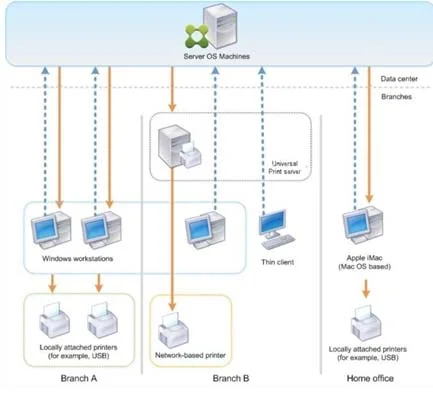
The correct answer is B. Citrix Universal Print Server. Explanation/Reference: https://docs.citrix.com/en-us/xenapp-and-xendesktop/7-15-ltsr/printing/printing-configuration- example.html Citrix Universal Print Server In Branch B, all printers are network-based and their queues are managed on a Windows print server, thus the Citrix…
Question
Scenario: A Citrix Architect needs to design a new XenApp and XenDesktop environment. The customer has a number of small field sales offices, each connected to the main datacenter located in the headquarters building that has a 1.5 Mbps MPLS WAN link. Each field sales office has between 5 and 10 concurrent users connecting to the Citrix environment hosted in the main datacenter. The customer would like to ensure that print jobs are compressed as much as possible to reduce any poor user experience in the field offices. Click the Exhibit button to view additional details about the environment. What should the architect recommend for mapping the blue printer in the Exhibit?
Exhibit
Options
- ACitrix Client Printer with OEM driver
- BCitrix Universal Print Server
- CMicrosoft Group Policy Preference printer mapping
- DCitrix Client Printer with Universal print driver
- ECitrix Session Printer policy
How the community answered
(26 responses)- A4% (1)
- B81% (21)
- C4% (1)
- D12% (3)
Explanation
Explanation/Reference: https://docs.citrix.com/en-us/xenapp-and-xendesktop/7-15-ltsr/printing/printing-configuration- example.html Citrix Universal Print Server In Branch B, all printers are network-based and their queues are managed on a Windows print server, thus the Citrix Universal Print Server is the most efficient configuration. All required printer drivers are installed and managed on the print server by local administrators. Mapping the printers into the virtual desktop or application session works as follows: For Windows-based workstations - The local IT team helps users connect the appropriate network-based printer to their Windows workstations. This enables users to print from locally- installed applications. connection if possible. The Citrix Universal Print Server components are installed and enabled, thus native printer drivers are not required. If a driver is updated or a printer queue is modified, no additional configuration is required in the
Topics
Community Discussion
No community discussion yet for this question.