
1D0-61B · Question #2
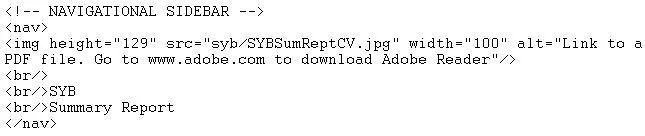
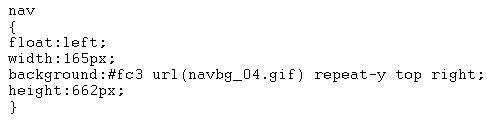
Consider the following HTML5 code: Also consider the following CSS code: This I-ITML5 and CSS code directs the sidebar background image to:
The correct answer is A. displayat the top-right of the sidebar. Option A is correct because the CSS code likely includes background-position: top right, which is a standard CSS property value that anchors the background image to the top-right corner of its containing element (the sidebar). Option B is wrong because background-position does…
Question
Consider the following HTML5 code:
Also consider the following CSS code:
This I-ITML5 and CSS code directs the sidebar background image to:
Exhibits
Options
- Adisplayat the top-right of the sidebar
- Bdisplay at a height of 129 pixels
- Cdisplay at the left of the sidebar
- Ddisplay horizontally
How the community answered
(36 responses)- A81% (29)
- B3% (1)
- C6% (2)
- D11% (4)
Explanation
Option A is correct because the CSS code likely includes background-position: top right, which is a standard CSS property value that anchors the background image to the top-right corner of its containing element (the sidebar). Option B is wrong because background-position does not control height in pixels - that would require a property like height or background-size. Option C is incorrect because positioning at the "left" would require a value like left or left center, not top right. Option D is wrong because horizontal tiling/repeating is controlled by background-repeat: repeat-x, not by a position value.
Memory tip: Think of background-position values as compass directions on a map - top right literally means the top-right corner. When you see two keyword values together, the first is vertical (top/center/bottom) and the second is horizontal (left/center/right), so top right = upper-right corner.
Topics
Community Discussion
No community discussion yet for this question.