
156-815.71 · Question #5
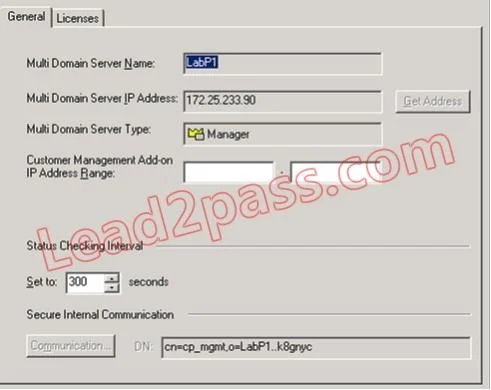
How would you navigate to the screen shown? Check Point 156-815.71 Exam
The correct answer is D. MDS Contents > Right-click MDS > Configure Multi Domain Server. Option D is correct because in Check Point's SmartDomain Manager, the MDS Contents panel is the top-level view that displays the Multi-Domain Server object itself. Right-clicking directly on the MDS object exposes the "Configure Multi Domain Server" option, which opens the…
Question
How would you navigate to the screen shown? Check Point 156-815.71 Exam
Exhibit
Options
- ACustomer Contents > Right-click Provider-1 > Manager 1 > Settings
- BFile > Edit > Customer Management Settings
- CManage Menu > Provider-1/Site > Manager 1 > Properties
- DMDS Contents > Right-click MDS > Configure Multi Domain Server
How the community answered
(33 responses)- A6% (2)
- B3% (1)
- C12% (4)
- D79% (26)
Explanation
Option D is correct because in Check Point's SmartDomain Manager, the MDS Contents panel is the top-level view that displays the Multi-Domain Server object itself. Right-clicking directly on the MDS object exposes the "Configure Multi Domain Server" option, which opens the global MDS settings screen - this is the only path that targets server-level configuration rather than domain or policy-level settings.
Why the distractors fail:
- A is wrong because "Customer Contents" is a different panel showing domain (customer) objects, not the MDS itself; navigating through it reaches domain-level properties, not MDS-level configuration.
- B is wrong because no "File > Edit > Customer Management Settings" path exists in SmartDomain Manager - this fabricates a menu sequence that doesn't match the actual GUI.
- C is wrong because the Manage menu leads to domain and policy management tasks, and "Provider-1/Site > Manager 1 > Properties" would open a site or management server's properties, not the MDS server's own configuration screen.
Memory tip: Think "MDS settings live in MDS Contents" - always right-click the server object itself (MDS) in the MDS Contents panel to reach server-wide configuration. If you're clicking inside Customer Contents, you've gone one level too deep into domain territory.
Community Discussion
No community discussion yet for this question.