
Check_Point
156-215.81 · Question #206
You want to reset SIC between smberlin and sgosaka. In SmartDashboard, you choose sgosaka, Communication, Reset. On sgosaka, you start cpconfig, choose Secure Internal Communication and enter the…
The correct answer is C. The check Point services on the Gateway were not restarted because you are still in the cpconfig. See the full explanation below for the reasoning.
Question
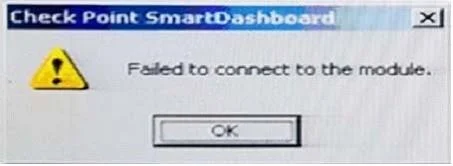
You want to reset SIC between smberlin and sgosaka. In SmartDashboard, you choose sgosaka, Communication, Reset. On sgosaka, you start cpconfig, choose Secure Internal Communication and enter the new SIC Activation Key. The screen reads The SIC was successfully initialized and jumps back to the menu. When trying to establish a connection, instead of a working connection, you receive this error message:
What is the reason for this behavior?
Exhibits
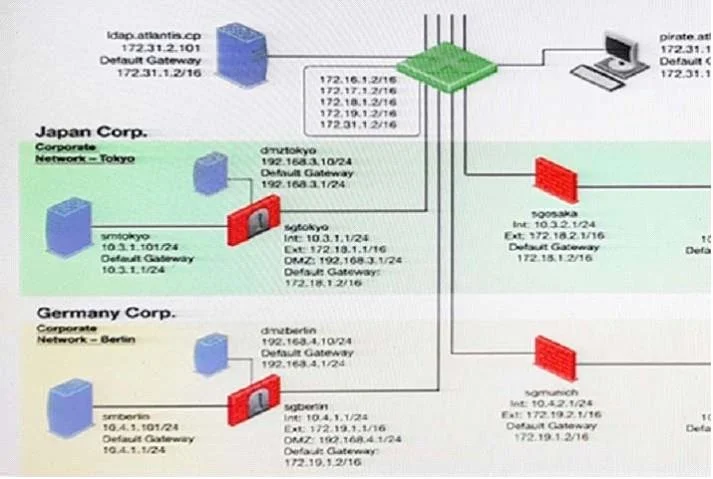
Options
- AThe Gateway was not rebooted, which is necessary to change the SIC key.
- BYou must first initialize the Gateway object in SmartDashboard (i.e., right-click on the object,
- CThe check Point services on the Gateway were not restarted because you are still in the cpconfig
- DThe activation key contains letters that are on different keys on localized keyboards. Therefore,
How the community answered
(22 responses)- A9% (2)
- B5% (1)
- C82% (18)
- D5% (1)
Community Discussion
No community discussion yet for this question.