
156-215.80 · Question #93
You are the administrator for Alpha Corp. You have logged into your R80 Management server. You are making some changes in the Rule Base and notice that rule No.6 has a pencil icon next to it. What…
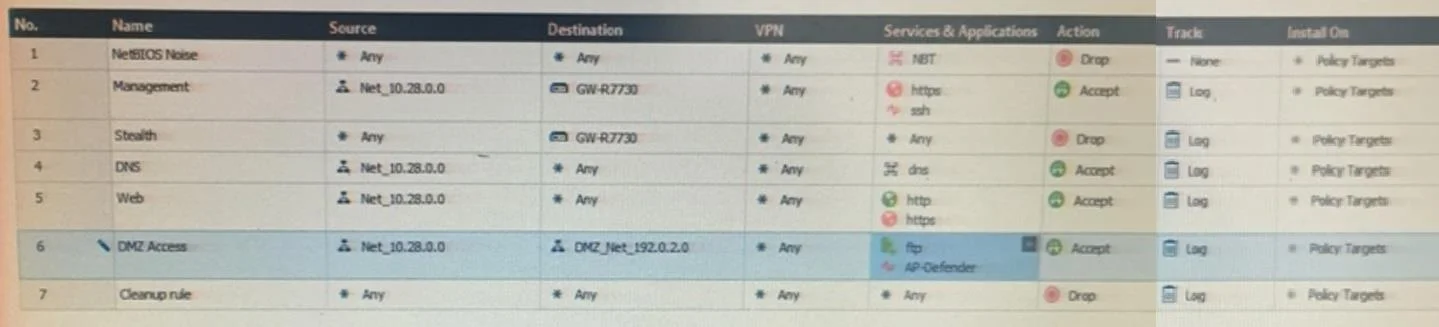
The correct answer is C. The rule No.6 has been marked for editing in your Management session. In Check Point R80 SmartConsole, a pencil icon next to a rule indicates that the rule is currently locked for editing within your own management session.
Question
You are the administrator for Alpha Corp. You have logged into your R80 Management server. You are making some changes in the Rule Base and notice that rule No.6 has a pencil icon next to it. What does this mean?
Exhibit
Options
- AThe rule No.6 has been marked for deletion in your Management session.
- BThe rule No.6 has been marked for deletion in another Management session.
- CThe rule No.6 has been marked for editing in your Management session.
- DThe rule No.6 has been marked for editing in another Management session.
How the community answered
(34 responses)- B3% (1)
- C94% (32)
- D3% (1)
Why each option
In Check Point R80 SmartConsole, a pencil icon next to a rule indicates that the rule is currently locked for editing within your own management session.
Rules marked for deletion display a different visual indicator such as a strikethrough or deletion marker, not a pencil icon.
Deletion actions in another administrator's session are shown with a different conflict or lock indicator, not the pencil icon.
Check Point R80 SmartConsole uses a session-based locking model where any object or rule you are actively editing displays a pencil icon to indicate your session holds the lock. This prevents other concurrent administrators from making conflicting changes to the same rule. The pencil icon is tied specifically to your own session context, distinguishing it from lock indicators used for other sessions.
When another administrator's session holds an edit lock on a rule, a distinct lock or conflict icon is displayed - the pencil icon is reserved for your own session's edits.
Concept tested: Check Point R80 SmartConsole session-based rule locking
Source: https://sc1.checkpoint.com/documents/R80/CP_R80_SmartConsole_ReleaseNotes/html_frameset.htm
Topics
Community Discussion
No community discussion yet for this question.