
156-215.80 · Question #71
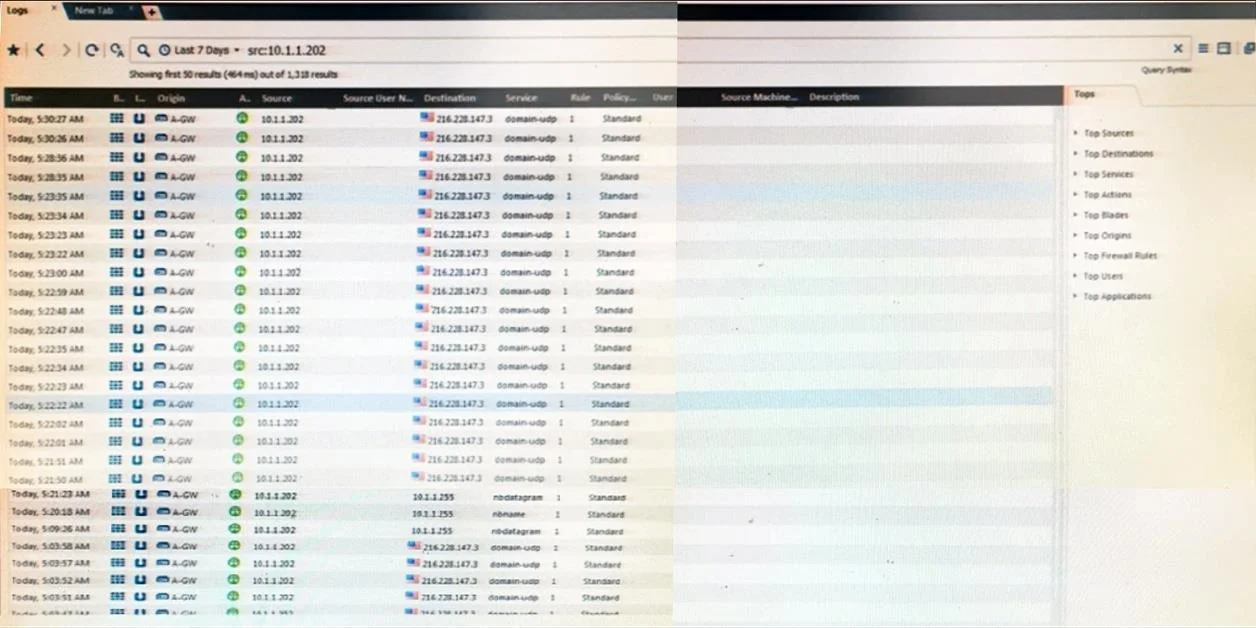
The following graphic shows:
The correct answer is C. View from SmartView Tracker for logs initiated from source address 10.1.1.202. SmartView Tracker is the legacy Check Point log viewer used in versions prior to R80, and the view shown displays connection logs filtered by source IP address 10.1.1.202.
Question
The following graphic shows:
Exhibit
Options
- AView from SmartLog for logs initiated from source address 10.1.1.202
- BView from SmartView Tracker for logs of destination address 10.1.1.202
- CView from SmartView Tracker for logs initiated from source address 10.1.1.202
- DView from SmartView Monitor for logs initiated from source address 10.1.1.202
How the community answered
(29 responses)- B3% (1)
- C90% (26)
- D7% (2)
Why each option
SmartView Tracker is the legacy Check Point log viewer used in versions prior to R80, and the view shown displays connection logs filtered by source IP address 10.1.1.202.
SmartLog is the newer search-based log viewer introduced in R80 and is a distinct application from SmartView Tracker; the two tools should not be used interchangeably.
The log view is filtered on source address 10.1.1.202, not on destination address, making the destination-based description incorrect.
SmartView Tracker is the traditional table-based log viewing tool in Check Point environments running versions prior to R80, presenting firewall connection logs with columns for source, destination, service, and action. The graphic depicts logs filtered to show only traffic initiated from source address 10.1.1.202, which is the standard way SmartView Tracker presents source-filtered log queries.
SmartView Monitor is a real-time performance and traffic monitoring tool used to observe gateway status and active connections, not to review historical log entries.
Concept tested: Check Point SmartView Tracker source-filtered log view
Source: https://sc1.checkpoint.com/documents/R77/CP_R77_SmartViewTracker_AdminGuide/html_frameset.htm
Topics
Community Discussion
No community discussion yet for this question.