
156-215.80 · Question #549
View the rule below. What does the pen-symbol in the left column mean?
The correct answer is B. Rules have been edited by the logged in administrator, but the policy has not been published. In Check Point SmartConsole, the pen symbol next to a rule indicates that the currently logged-in administrator has edited those rules but the policy session has not yet been published.
Question
View the rule below. What does the pen-symbol in the left column mean?
Exhibit
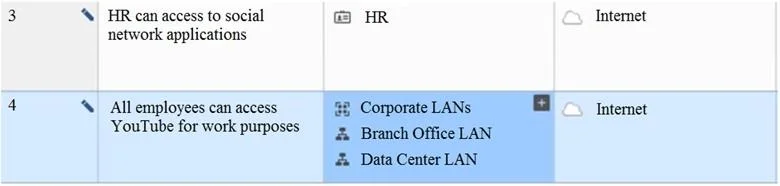
Options
- AThose rules have been published in the current session.
- BRules have been edited by the logged in administrator, but the policy has not been published
- CAnother user has currently locked the rules for editing.
- DThe configuration lock is present. Click the pen symbol in order to gain the lock.
How the community answered
(28 responses)- A4% (1)
- B93% (26)
- D4% (1)
Why each option
In Check Point SmartConsole, the pen symbol next to a rule indicates that the currently logged-in administrator has edited those rules but the policy session has not yet been published.
Already-published rules would not display the pen symbol, because the pen specifically indicates pending changes that have not yet been published to the management database.
Check Point SmartConsole uses a session-based publish workflow where changes are held locally until the administrator explicitly publishes them. The pen icon marks rules that were modified during the current session by the logged-in administrator, visually distinguishing unpublished local edits from the last published policy state.
A lock or padlock icon indicates that another administrator has locked a rule or object for exclusive editing, not the pen symbol.
The configuration lock state is represented by a separate lock icon; the pen symbol is specifically tied to unsaved or unpublished edits by the current user, not to a global lock status.
Concept tested: Check Point SmartConsole unpublished rule edit indicator
Source: https://sc1.checkpoint.com/documents/R81.20/WebAdminGuides/EN/CP_R81.20_SecurityManagement_AdminGuide/Default.htm
Topics
Community Discussion
7 Anjali D.Apr 12, 2026
The correct answer is B, and our group landed on this pretty confidently after working through the R80 SmartConsole workflow together. The pen symbol flags rules that have been modified in the current session by the logged-in admin but have not yet been published to the Security Management Server. Check Point R80 uses a publish model, so edits exist in a private session until you explicitly publish them, which is a key architectural detail that separates it from older versions. A is wrong because publishing would clear that indicator, not create it, and C and D describe lock states which are represented differently in the interface. If you see the pen icon on your exam question, think "unpublished local edits" and you will be in good shape. Anyone in the group want to add context on how this interacts with concurrent admin sessions?
 Orla P.May 6, 2026
I almost circled A on my first pass because "published in the current session" sounds close enough when you see a pen marking rows, but then I caught myself thinking about what publishing actually does, it clears those indicators, so a pen after publishing makes no sense. B is right because the pen marks a local edit that is sitting in memory for the logged-in admin, policy not installed yet, changes not visible to traffic. D is the common trap here, the configuration lock is a separate concept with its own icon, and clicking a pen symbol does not hand you a lock on anything.
 Toby R.May 7, 2026
The D trap is the one that got people in my study group too, worth adding that the lock icon question actually showed up separately on mine and was testing write access to the config store, completely different layer than where the pen sits.
Toby R.Apr 14, 2026This one tripped me up during my prep because I kept confusing the publish workflow with the install policy workflow, and they are not the same thing. In SmartConsole, when you make changes to rules they get saved to your session first, and that pen symbol is basically the UI telling you those specific rules are dirty, meaning modified but not yet published. Publishing pushes your changes to the management database so other admins can see them, but that is still separate from installing the policy to the gateways. So you could have the pen symbol gone after publishing and still have rules not running on your firewall yet. Quick question though, if two admins are both logged in and one of them publishes a change, does the other admin see those published changes automatically in their session, or do they need to do something to pull them in?
 Dervla O.May 15, 2026
So the pen means "edited but not yet pushed out" - does that match how you think about the publish step in this product?
Orla P.May 16, 2026That is a solid read, though I would tweak it slightly, the pen icon just flags that you have made a local change to that response, and the publish step is what actually pushes the updated version out to test takers.
 Samuel O.Apr 28, 2026
The pen icon in that left column is the classic "modified but not published" indicator in SmartConsole, option B is right. If you hit Install Policy before that icon clears, you push your edits live, but if you close without publishing, those changes sit in a pending state tied to your session.