
156-215.80 · Question #477
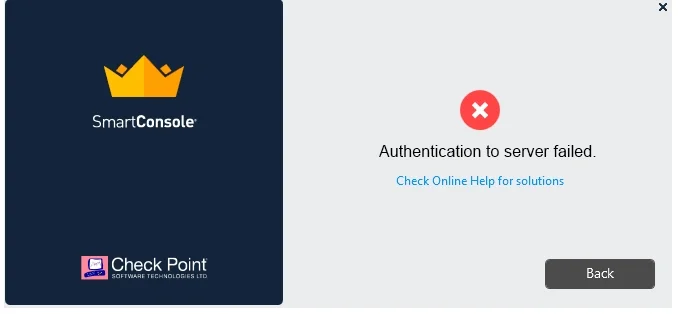
Vanessa is attempting to log into the Gaia Web Portal. She is able to login successfully. Then she tries the same username and password for SmartConsole but gets the message in the screenshot image…
The correct answer is B. Check Point Management software authentication details are not automatically the same as. Check Point maintains separate user databases for the Gaia OS and the Management Server, so Gaia credentials do not automatically grant SmartConsole access.
Question
Vanessa is attempting to log into the Gaia Web Portal. She is able to login successfully. Then she tries the same username and password for SmartConsole but gets the message in the screenshot image below. She has checked that the IP address of the Server is correct and the username and password she used to login into Gaia is also correct. What is the most likely reason?
Exhibit
Options
- ACheck Point R80 SmartConsole authentication is more secure than in previous versions and
- BCheck Point Management software authentication details are not automatically the same as
- CSmartConsole Authentication is not allowed for Vanessa until a Super administrator has
- DAuthentication failed because Vanessa's username is not allowed in the new Threat
How the community answered
(36 responses)- B94% (34)
- C3% (1)
- D3% (1)
Why each option
Check Point maintains separate user databases for the Gaia OS and the Management Server, so Gaia credentials do not automatically grant SmartConsole access.
Enhanced security mechanisms in R80 would not cause a login failure if the user's account existed in the Management database with correct credentials; the issue is the absence of the account, not the security level.
Gaia OS user accounts are stored in the underlying operating system's user database, while SmartConsole administrator accounts are stored in the Check Point Management Server's own internal database. A user valid in Gaia is not automatically provisioned as a management administrator, so Vanessa must be explicitly created as a SmartConsole administrator with the appropriate permissions in the Management Server's user configuration.
No standard Check Point configuration requires a Super administrator to pre-approve individual SmartConsole login attempts before a user is permitted to authenticate.
Threat Prevention policies govern security inspection of network traffic and have no role in controlling or restricting SmartConsole administrator authentication.
Concept tested: Separation of Gaia OS and SmartConsole administrator authentication
Source: https://sc1.checkpoint.com/documents/R80.40/WebAdminGuides/EN/CP_R80.40_Gaia_AdminGuide/Content/Topics-GAG/User-Management.htm
Topics
Community Discussion
No community discussion yet for this question.