
156-215.80 · Question #389
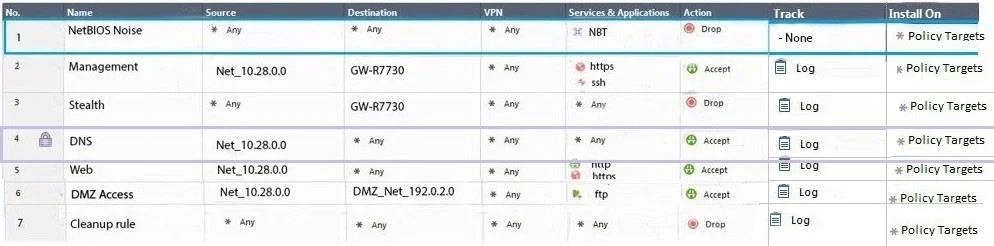
Administrator Dave logs into R80 Management Server to review and makes some rule changes. He notices that there is a padlock sign next to the DNS rule in the Rule Base. What is the possible…
The correct answer is B. Another administrator is logged into the Management and currently editing the DNS Rule. In R80, a padlock icon next to a rule indicates that another administrator has that rule locked in their active editing session.
Question
Administrator Dave logs into R80 Management Server to review and makes some rule changes. He notices that there is a padlock sign next to the DNS rule in the Rule Base. What is the possible explanation for this?
Exhibit
Options
- ADNS Rule is using one of the new feature of R80 where an administrator can mark a rule with the
- BAnother administrator is logged into the Management and currently editing the DNS Rule.
- CDNS Rule is a placeholder rule for a rule that existed in the past but was deleted.
- DThis is normal behavior in R80 when there are duplicate rules in the Rule Base.
How the community answered
(41 responses)- A2% (1)
- B90% (37)
- C5% (2)
- D2% (1)
Why each option
In R80, a padlock icon next to a rule indicates that another administrator has that rule locked in their active editing session.
R80 does not include a feature that allows administrators to manually mark or lock a rule with a padlock for annotation purposes.
R80 introduced concurrent administration, allowing multiple administrators to be logged in simultaneously. When one administrator is actively editing a rule within their session, a padlock icon appears next to that rule for other administrators, indicating it is locked and currently being modified by another session.
Deleted rules are removed from the Rule Base entirely; there is no placeholder padlock mechanism for previously deleted rules.
Duplicate rules do not trigger a padlock icon; R80 does not use padlocks to flag duplicate entries.
Concept tested: R80 concurrent administration rule locking indicator
Source: https://sc1.checkpoint.com/documents/R80/CP_R80_SecurityManagement_AdminGuide/html_frameset.htm
Topics
Community Discussion
No community discussion yet for this question.