
156-215.80 · Question #274
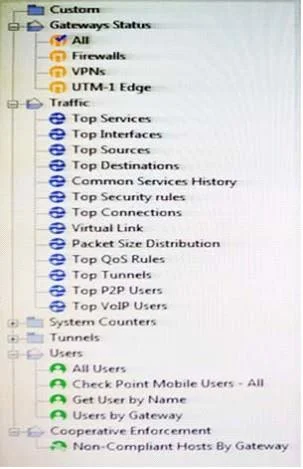
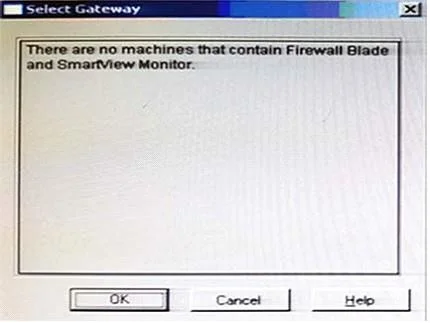
You have just installed your Gateway and want to analyze the packet size distribution of your traffic with SmartView Monitor. Unfortunately, you get the message: "There are no machines that contain…
The correct answer is D. Enable Monitoring on your Security Gateway. SmartView Monitor requires the Monitoring blade to be enabled on the Security Gateway - not the Security Management Server - to collect and display traffic statistics such as packet size distribution.
Question
You have just installed your Gateway and want to analyze the packet size distribution of your traffic with SmartView Monitor. Unfortunately, you get the message:
"There are no machines that contain Firewall Blade and SmartView Monitor". What should you do to analyze the packet size distribution of your traffic? Give the BEST answer.
Exhibits
Options
- APurchase the SmartView Monitor license for your Security Management Server.
- BEnable Monitoring on your Security Management Server.
- CPurchase the SmartView Monitor license for your Security Gateway.
- DEnable Monitoring on your Security Gateway.
How the community answered
(23 responses)- A9% (2)
- B4% (1)
- C17% (4)
- D70% (16)
Why each option
SmartView Monitor requires the Monitoring blade to be enabled on the Security Gateway - not the Security Management Server - to collect and display traffic statistics such as packet size distribution.
The SmartView Monitor license must be applied to the Security Gateway, not the Security Management Server, because the SMS does not process traffic.
Enabling Monitoring on the Security Management Server does not grant the gateway the ability to collect or report traffic statistics.
Purchasing a license alone is insufficient if the Monitoring blade has not also been enabled and applied to the gateway in the policy.
SmartView Monitor collects traffic metrics directly from the Security Gateway because that is where packets are actually processed and inspected. Enabling the Monitoring blade on the gateway activates the data collection agents that feed packet size, throughput, and connection rate data to SmartView Monitor. Without this blade enabled on the gateway, no traffic data exists for the monitor to display.
Concept tested: Check Point SmartView Monitor blade enablement on gateway
Source: https://sc1.checkpoint.com/documents/R81.20/WebAdminGuides/EN/CP_R81.20_SecurityManagement_AdminGuide/Content/Topics-SECMG/SmartView-Monitor.htm
Topics
Community Discussion
No community discussion yet for this question.