
156-215.80 · Question #152
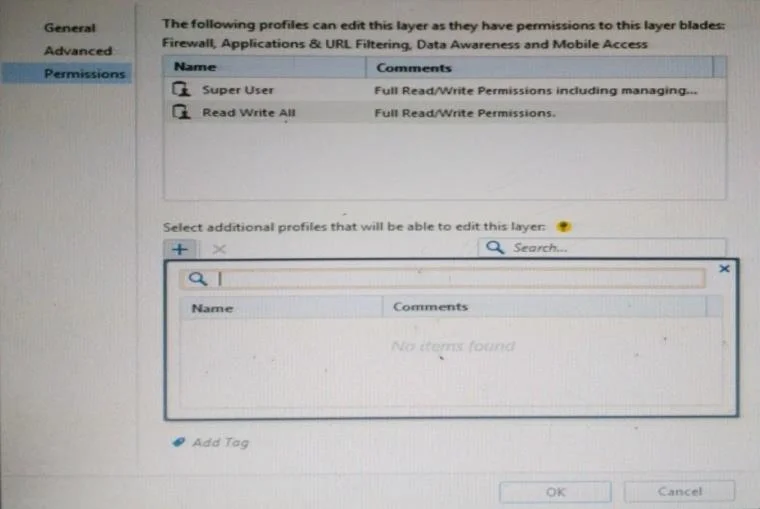
You want to define a selected administrator's permission to edit a layer. However, when you click the + sign in the "Select additional profile that will be able edit this layer" you do not see…
The correct answer is B. There are no permission profiles available and you need to create one first. When no permission profiles have been created in SmartConsole, the profile selector appears empty when attempting to assign additional layer edit permissions.
Question
You want to define a selected administrator's permission to edit a layer. However, when you click the + sign in the "Select additional profile that will be able edit this layer" you do not see anything. What is the most likely cause of this problem?Select the BEST answer.
Exhibit
Options
- A"Edit layers by Software Blades" is unselected in the Permission Profile
- BThere are no permission profiles available and you need to create one first.
- CAll permission profiles are in use.
- D"Edit layers by selected profiles in a layer editor" is unselected in the Permission profile.
How the community answered
(26 responses)- A4% (1)
- B81% (21)
- C8% (2)
- D8% (2)
Why each option
When no permission profiles have been created in SmartConsole, the profile selector appears empty when attempting to assign additional layer edit permissions.
The 'Edit layers by Software Blades' setting controls blade-based layer editing restrictions, not the availability of profiles in the additional profile selector.
The profile selection list is empty because no permission profiles exist in the system yet. Before assigning a profile to control layer editing access, at least one permission profile must first be created in SmartConsole's Manage and Settings section, as the selector can only display profiles that already exist.
If all profiles were already in use, they would still appear in the selector list - an empty list indicates no profiles exist at all, not that all are occupied.
'Edit layers by selected profiles in a layer editor' must be enabled for profile-based layer editing, but an empty selector indicates no profiles have been created yet, which is a prerequisite before any such setting can take effect.
Concept tested: Check Point SmartConsole permission profile layer editing assignment
Source: https://sc1.checkpoint.com/documents/R81.20/WebAdminGuides/EN/CP_R81.20_SecurityManagement_AdminGuide/Content/Topics-SMAG/Configuring-Policy-Layers.htm
Topics
Community Discussion
No community discussion yet for this question.