
156-215.80 · Question #149
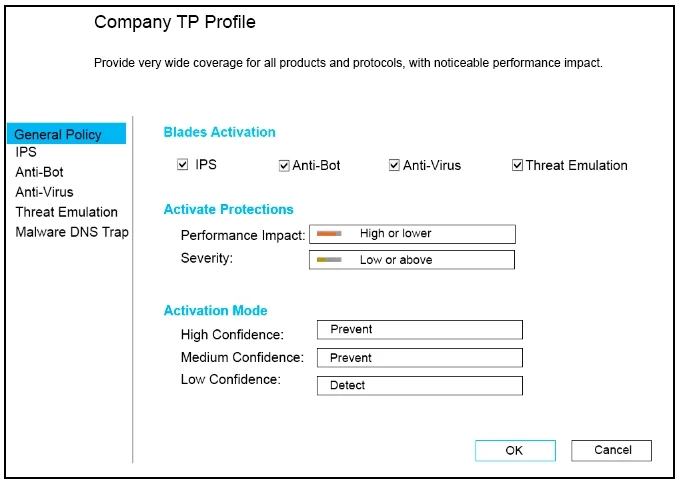
Provide very wide coverage for all products and protocols, with noticeable performance impact. How could you tune the profile in order to lower the CPU load still maintaining security at good…
The correct answer is B. Set the Performance Impact to Medium or lower. In Check Point Threat Prevention profiles, the Performance Impact setting directly controls the tradeoff between inspection breadth and CPU resource consumption.
Question
Provide very wide coverage for all products and protocols, with noticeable performance impact. How could you tune the profile in order to lower the CPU load still maintaining security at good level?Select the BEST answer.
Exhibit
Options
- ASet High Confidence to Low and Low Confidence to Inactive.
- BSet the Performance Impact to Medium or lower.
- CThe problem is not with the Threat Prevention Profile. Consider adding more memory to the
- DSet the Performance Impact to Very Low Confidence to Prevent.
How the community answered
(24 responses)- A4% (1)
- B75% (18)
- C8% (2)
- D13% (3)
Why each option
In Check Point Threat Prevention profiles, the Performance Impact setting directly controls the tradeoff between inspection breadth and CPU resource consumption.
Setting High Confidence to Low changes detection confidence thresholds and would not directly reduce CPU load - it alters what actions are taken on detections, not the depth of inspection.
The Threat Prevention profile's Performance Impact setting determines how aggressively the engine inspects traffic - a setting of Medium or lower restricts the inspection scope to reduce CPU overhead. This directly addresses the 'noticeable performance impact' caused by the wide-coverage profile configuration while still maintaining meaningful threat detection for high-confidence signatures.
The performance problem is explicitly caused by the Threat Prevention profile's inspection scope settings, not insufficient memory - adding RAM does not resolve CPU-bound inspection overhead.
This option conflates the Performance Impact setting with the Confidence Level action setting into a nonsensical configuration that does not represent a valid or effective tuning option.
Concept tested: Check Point Threat Prevention profile performance impact tuning
Source: https://sc1.checkpoint.com/documents/R81/WebAdminGuides/EN/CP_R81_ThreatPreventionAdminGuide/Content/Topics-TPG/Profiles.htm
Topics
Community Discussion
No community discussion yet for this question.